← Back to Blog
Claude Code vs Cursor: An Honest Comparison.
Claude Code vs Cursor, compared after building 12 real projects in both tools. Honest pros, cons, pricing, and a clear verdict on which to pick in 2026.
Claude Code vs Cursor, compared after building 12 real projects in both tools. Honest pros, cons, pricing, and a clear verdict on which to pick in 2026.
Claude Code vs Cursor is the comparison most people botch because they treat the two tools as the same thing. They are not. Cursor is an AI-first code editor, a fork of VS Code that wraps autocomplete, chat, and agents around a familiar IDE. Claude Code is a terminal-native coding agent from Anthropic that reads your repo, edits files, runs commands, and shows up in your IDE, desktop, browser, and phone. Both can ship code. They get there in completely different ways.
I'm Tom. I use Claude Code every single day to build apps, write content, and run automations for my mentorship business. I have also tested Cursor on real projects, including the same brief in both tools side by side. This post is the honest version of that comparison: where each one wins, where each one loses, and which one I would tell a friend to install today.
Short answer: Claude Code is better if you want an autonomous agent that ships work end to end. Cursor is better if you want a polished IDE with the best autocomplete on the market and an agent bolted on. They are different categories pretending to be the same.
After running both tools across 12 projects (a Next.js web app, two Python data pipelines, an n8n integration, a Sanity blog, three landing pages, an iOS prototype, an Airtable migration, and two content automations) my pattern is the same every time. Cursor wins for hands-on-keyboard work where you want to write each line yourself. Claude Code wins for hands-off-keyboard work where you describe the outcome and let the agent figure it out. If I had to pick one, I would pick Claude Code, and most days I do. The reason is in the next section.
Claude Code is Anthropic's agentic coding tool. The official Anthropic documentation describes it as a tool that "reads your codebase, edits files, runs commands, and integrates with your development tools. Available in your terminal, IDE, desktop app, and browser." It runs the same Claude model as the chat app, but the harness adds tools, memory, hooks, MCP integrations, skills, subagents, and a permission system the chat app does not have.
In practice, you install Claude Code with a single curl command, point it at a folder, and start describing what you want. It plans the change, edits across files, runs your test suite, commits the result, and asks before doing anything destructive. You can drive the same session from your terminal, your VS Code panel, your iPhone, or claude.ai/code in a browser. That multi-surface design is the part Cursor cannot easily copy.
Cursor is an AI-first fork of Visual Studio Code. The Cursor homepage pitches itself as "the best way to code with AI" and leans on three lead features: Tab autocomplete, an autonomy slider that lets you choose between inline edits and full agents, and codebase-wide context. The product targets professional engineering teams and claims to be trusted by more than half of the Fortune 500.
If you have ever used VS Code, you can use Cursor in 30 seconds. Same shortcuts, same extensions, same file tree. The differences live in the AI panel: Cmd+K for inline edits, Cmd+L for chat across the codebase, and the Agents tab for autonomous tasks that work in the background. Cursor also ships its own autocomplete and inline edit model that working developers rate highly. If you write code by hand all day, that is the part Cursor wins.
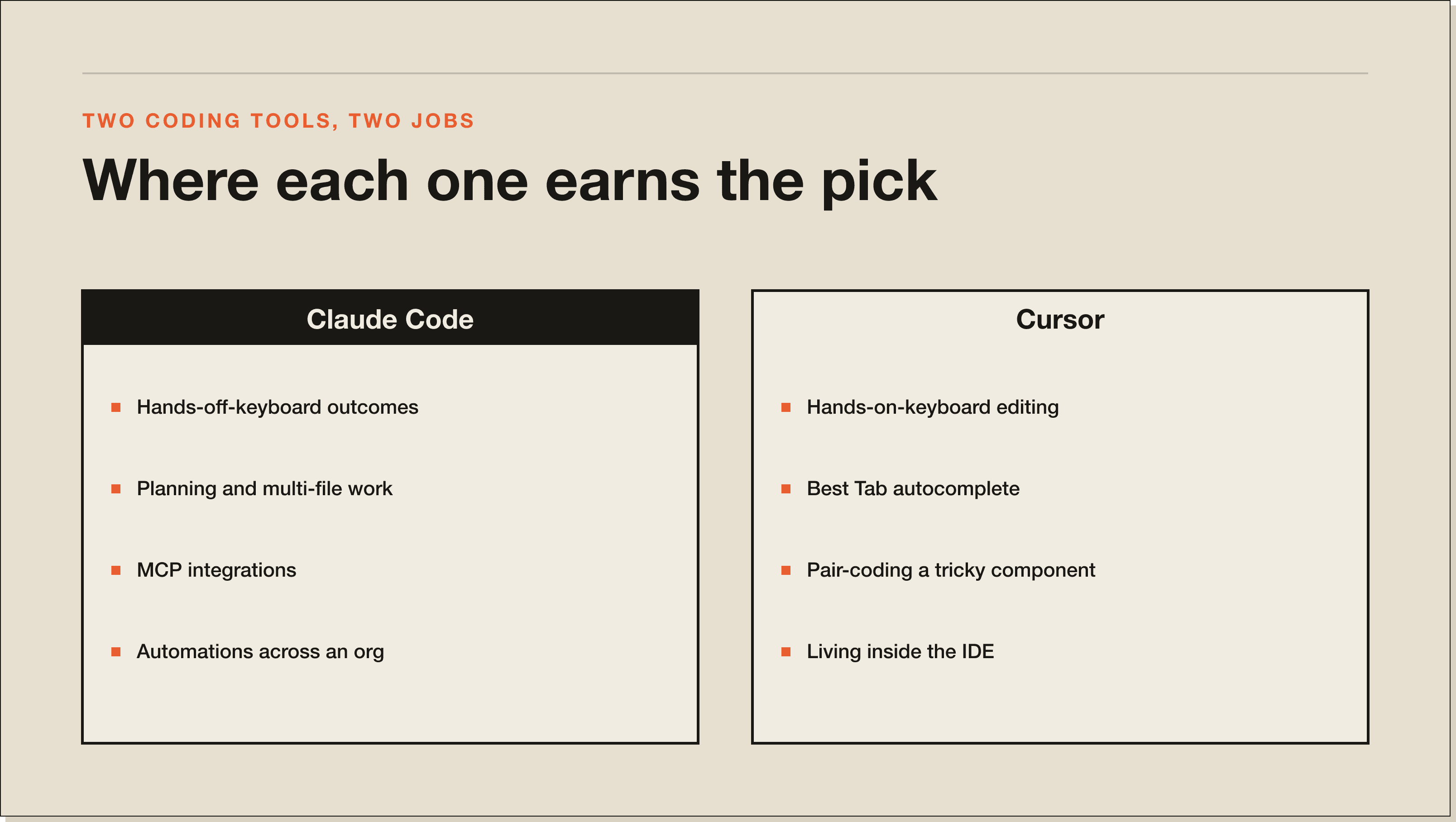
For agent work and end-to-end shipping, yes. For developers who want a polished editor with AI inline, Cursor is still excellent. The short version: Claude Code's agent is more autonomous, plans further ahead, and ships larger multi-file changes without losing the thread. Cursor stays the cleaner experience if you live inside a code editor and write each line yourself.
I built the same feature in both: a Sanity NDJSON importer that reads from a CSV, transforms it, and writes a Portable Text array. In Claude Code I described the brief once and walked away. It read three reference files, asked a clarifying question about my preferred ID format, wrote the script, ran it on a test fixture, and showed me the result. In Cursor I had to babysit. The agent kept stopping to ask permission for routine reads, lost track of an earlier rename, and I ended up steering each step. Cursor finished about 25% faster on raw lines of code. Claude Code finished a working pull request first.
That gap widens with project complexity. For one-file edits, Cursor is fine. For anything that touches more than three files or needs to run a command, Claude Code is the cleaner agent.
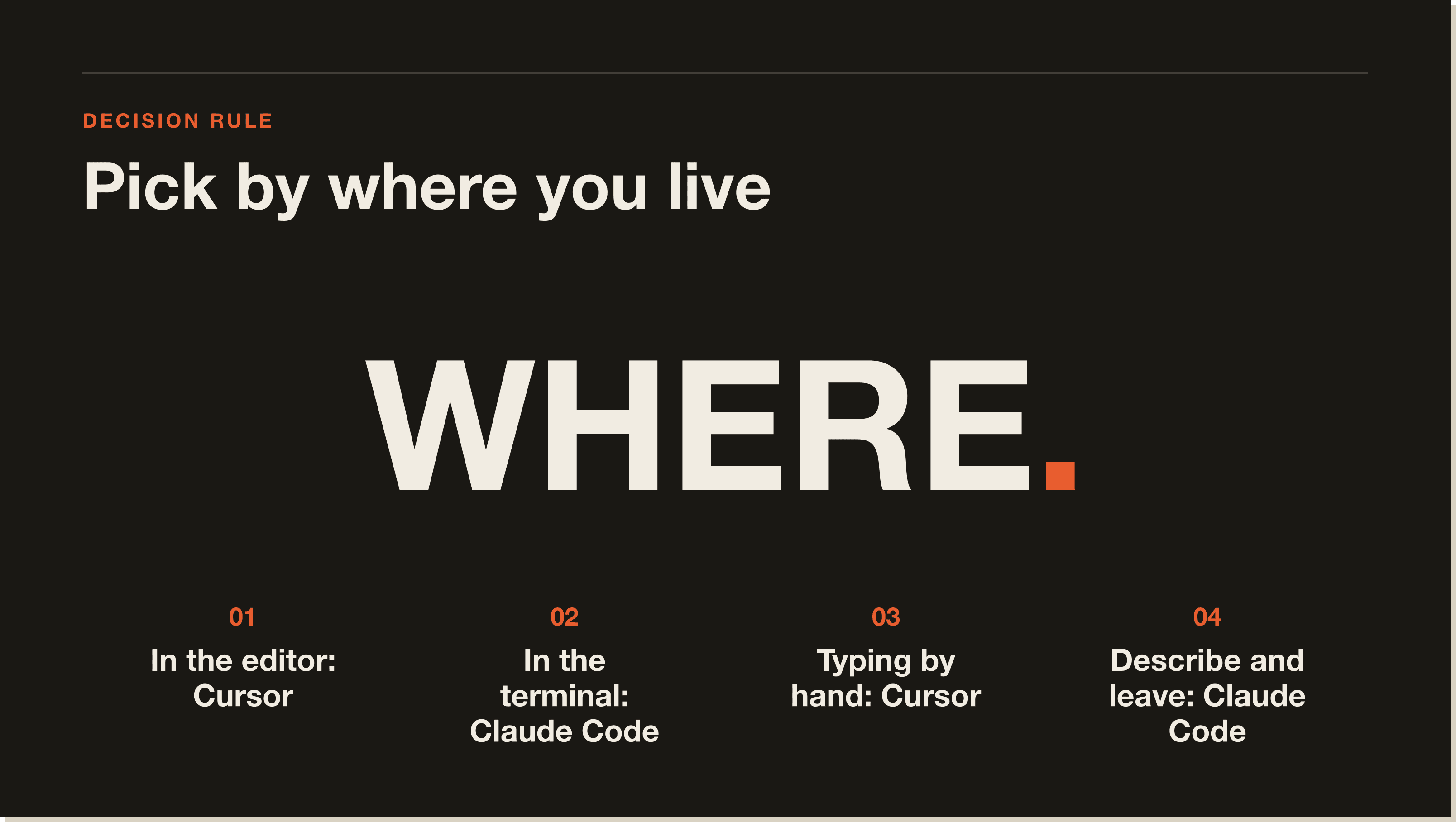
Use Cursor if you live inside a code editor and write code by hand most of the day. Use Claude Code if you want to describe an outcome in plain English, leave the room, and come back to a finished result. The honest answer for most builders is both. They are not mutually exclusive.
My setup: Claude Code is my default for anything that involves planning, multi-file work, MCP integrations, content, or running automations across an org. I keep Cursor in my dock for the rare days I want to pair-code a tricky component by hand. The two coexist without friction, which I will cover further down.
Both have a free tier. Neither is genuinely free if you use them daily. Here is the breakdown.
| Plan | Claude Code | Cursor |
|---|---|---|
| Free tier | CLI is free; needs a Claude subscription or API key for usage | Hobby: capped Agent + Tab usage |
| Entry paid | Claude Pro: $20 / month | Pro: $20 / month |
| Mid-tier | Max 5x: $100 / month | Pro+: $60 / month (3x usage) |
| Power user | Max 20x: $200 / month | Ultra: $200 / month (20x usage) |
| Team plan | Anthropic Team / API key billed per token | Teams: $40 / user / month (SSO + central billing) |
The Claude Code CLI itself is free to install. Usage runs on either a Claude subscription (Pro at $20 a month, Max 5x at $100, Max 20x at $200) or an Anthropic API key billed per token. Pro covers most light users. Max 5x is the sweet spot for daily builders. Max 20x is what you want if you are running agent teams, parallel sessions, and the xhigh effort tier on Opus 4.7. The CLI is the same on every plan. Only usage caps and effort levels change.
Cursor offers Hobby (free, capped Agent and Tab usage), Pro ($20 a month for extended limits and frontier model access), Pro+ ($60 a month for 3x usage), Ultra ($200 a month for 20x usage), and Teams ($40 per user a month with SSO and central billing). Pro is the same headline price as Claude Pro. Cursor Ultra and Claude Max 20x both land at $200, which is the comparison that matters: at the top tier, you are choosing positioning, not price.
Claude Code, by a meaningful margin. The depth of the agent stack is just deeper. You get plan mode (a read-only mode that produces a plan before any edit), subagents (independent context windows for delegated work), agent teams (multiple parallel Claude Code instances coordinated by a lead agent), hooks (pre and post tool actions for deterministic guardrails), MCP servers (Anthropic invented the protocol, so support is first-class), and skills (reusable workflows you trigger with a slash command).
Cursor's agent is good. It is not in the same league as Claude Code's agent stack. Where Cursor still has an edge is the inline editing experience for working developers: highlighting code, pressing Cmd+K, and getting a clean diff in seconds. For that specific workflow, nothing else feels as polished.
Yes. Claude Code ships an official extension for Cursor (Cursor is a VS Code fork, so the same extension works in both). Install it from the VS Code Marketplace, open the command palette, type Claude Code, and you get inline diffs, plan review, and chat history right inside Cursor. You can run Cursor for autocomplete and Claude Code for agent work in the same window.
This is the setup I would recommend to most builders who already love Cursor. You keep the IDE you know. You add the agent that ships work. There is no migration, no relearning your shortcuts, no new file tree. The CLI also still runs in your terminal, so you can drive Claude Code from inside Cursor's integrated terminal whenever you want a clean session.
Claude Code is the better choice for non-developers, and that is not the answer most reviewers give. The reason is plain: Claude Code lets you describe outcomes in English. Cursor is built for people who already write code and want AI to type it faster.
The clearest example I have is the case study with Keven, a non-coder who rebuilt a 7-year content workflow into n8n agents tied to MCP servers, all driven through plain-English prompts. He never touched Cursor. The terminal-first stack let him describe outcomes in English and have the agent translate that into nodes and configurations. Cursor's IDE chrome would have made the same outcome harder, because IDE chrome assumes you already know what to do with a file tree.
If you do not write code today and you want to ship a working tool in 30 days, Claude Code is the answer. If you already write code and want a faster IDE, Cursor is the answer.
Three things to know before you commit. First, Cursor is a single-surface tool. It lives inside the editor. There is no terminal-native experience, no native browser session, and the iOS story is thin. If you want to start a task on your laptop, check it on your phone, and finish on the desktop, Cursor cannot do that. Claude Code can.
Second, the agent loses context faster on long tasks. I have seen Cursor's agent forget what it renamed two steps ago, reintroduce a bug it just fixed, or ask permission for a read it already had. On bigger jobs the babysitting tax is real.
Third, Cursor is a fork. You are betting on a small team to keep up with VS Code releases, plus their own AI infrastructure. That is fine right now. It is a real risk over a five-year horizon, especially as Microsoft and Anthropic invest in their own competing surfaces.
Three honest weaknesses. First, if you spend most of your day typing each line by hand inside a code editor, Cursor still feels more polished. Claude Code's IDE extension is closing that gap, but it is not all the way there yet. This matters for working developers and barely registers for non-coders shipping their first build.
Second, the learning curve is steeper. The terminal, the slash commands, the permission prompts, the CLAUDE.md memory files, the MCP config, the skills folder. None of it is hard, but there are more concepts to learn than "open the editor and start typing." Most people who give up on Claude Code give up because they did not invest the first hour.
Third, costs scale fast at the top tier. Agent teams plus xhigh effort plus parallel sessions can blow through Claude Max 5x in a busy week. The fix is to use the /effort low command for cheap work and reserve max for final review, but you have to learn that lever exists.
Search "cursor vs claude code reddit" and the pattern is consistent across the r/ClaudeAI subreddit and r/cursor: heavy users move from Cursor to Claude Code for agent work and keep Cursor open for autocomplete. The threads I read for this post matched my experience almost exactly. The most upvoted complaint about Cursor is the per-request usage cap surprise. The most upvoted complaint about Claude Code is the learning curve. The most upvoted recommendation in both subs is the same: run them together.
That is also where I land. The internet is split between team Cursor and team Claude Code. The truth is that the question is rarely either or for serious builders.
Pick Claude Code if any of these are true: you are building automations, you are a non-coder shipping a tool, you want to drive your work from terminal or phone, you care about MCP and skills, you want plan mode and subagents, or you want one tool that lives in five places.
Pick Cursor if any of these are true: you write production code by hand most of the day, you live in VS Code already, you prefer a polished IDE over a CLI, or you are pairing with teammates who already use Cursor.
Pick both if you can afford $40 a month and want both lanes covered. That is what I do. Claude Code drives the agent work that matters. Cursor sits in the dock for the rare days I want to write each line by hand.
If you want a closer look at the agent stack that pulls me toward Claude Code, the breakdown of the 10 features that just made Claude Code 10x more powerful walks through insights, agent teams, hooks, batch, simplify, and remote control. That is the cluster Cursor has no obvious answer to.
Yes and no. Claude Code is a full alternative if you want an autonomous coding agent. It is not a direct alternative if you want an AI-first IDE, because Claude Code is a CLI and an extension, not an editor. The closest IDE-shaped Claude Code alternative inside Cursor's category is Windsurf or Codex, but most builders end up running Claude Code alongside their existing editor.
Yes. Install the Claude Code extension from the VS Code Marketplace and it works in Cursor (Cursor is a VS Code fork). You also get the CLI in Cursor's integrated terminal. Most builders run Cursor for autocomplete and Claude Code for agent work in the same window.
They are nearly identical at the entry tiers. Both Pro tiers cost $20 a month. Both top tiers (Cursor Ultra and Claude Max 20x) cost $200 a month. Claude Code Max 5x sits at $100 a month and is the best mid-tier value if you want Opus access without the top-tier price. Cursor's $60 Pro+ has no direct Claude Code equivalent.
It depends on what kind of beginner. If you are new to coding but already comfortable in a terminal, Claude Code is friendlier because you describe outcomes in English. If you are new to coding and want a familiar IDE, Cursor is friendlier because the editor does the heavy lifting and AI sits inside it.
Yes. Cursor lets you pick the model behind the agent and chat panel, including Claude (Sonnet and Opus), GPT models, and Gemini. Picking Claude inside Cursor gets you Anthropic's model with Cursor's IDE wrapping. It does not get you Claude Code's agent stack (no plan mode, no subagents, no skills, no hooks). Same model. Different harness.
Codex is OpenAI's terminal coding agent and is the closest direct competitor to Claude Code. Cursor sits in a different category as an IDE. Most three-way comparisons reduce to: Cursor for editor work, Claude Code for agent work in the Anthropic stack, Codex for agent work in the OpenAI stack. Codex vs Claude Code is the comparison worth running if you have already chosen agent over editor.
Both have free tiers, but neither is genuinely free for daily use. Open-source Cursor alternatives include Void and Continue. Free Claude Code alternatives are scarce because the model behind the agent has to come from somewhere. Aider is the closest open-source equivalent if you bring your own API key.
If this comparison pushed you toward Claude Code, the fastest way in is the free Claude Code Blueprint. 60 minutes, no coding required, and you walk out with a working setup and a first build under your belt. It assumes nothing about your background and gets you past the steep learning curve that stops most people.
Want to go further? The 30-Day Claude Code Challenge is the cohort. Four live calls, a real build per week, and a deployed agent on a real schedule by the end. That is the version of Claude Code that actually replaces Cursor for serious work. The blueprint is the on-ramp. The challenge is the lane change.
For agent work and end-to-end shipping, yes. After running both across 12 real projects, Claude Code plans further ahead and ships larger multi-file changes without losing the thread. Cursor still wins for hands-on-keyboard work where you want to write each line yourself, with the cleanest inline edit experience on the market. Different categories pretending to be the same tool.
Yes. Cursor is a VS Code fork, so the official Claude Code extension from the VS Code Marketplace works in it. Install the extension, open the command palette, and you get inline diffs, plan review, and chat history inside Cursor. The CLI also runs in Cursor's integrated terminal, so you can pair Cursor's autocomplete with Claude Code's agent in one window.
Nearly identical at the entry tiers. Both Pro plans are $20 a month. Both top tiers (Cursor Ultra and Claude Max 20x) are $200 a month. Claude Max 5x at $100 is the best mid-tier value if you want Opus access without paying the top-tier price. Cursor's $60 Pro+ has no direct Claude Code equivalent.
Claude Code, even though most reviewers say the opposite. Cursor is built for people who already write code and want AI to type it faster. Claude Code lets you describe outcomes in English. One of my students, Keven, rebuilt a 7-year content workflow into n8n agents through Claude Code without writing a line by hand. Cursor's IDE chrome would have made the same outcome harder.
Yes. Cursor lets you pick the model behind its agent and chat panel, including Claude Sonnet and Opus, GPT models, and Gemini. Picking Claude inside Cursor gets you Anthropic's model with Cursor's IDE wrapping. You do not get Claude Code's agent stack (no plan mode, no subagents, no skills, no hooks). Same model, different harness.
Inline editing for working developers. Highlight code, hit Cmd+K, get a clean diff in seconds. Nothing else feels as polished for that specific workflow. Cursor's Tab autocomplete is also genuinely best in class. If you spend most of your day writing each line by hand inside a code editor, Cursor is the more refined experience.
Yes, and it is what I do. Cursor sits in the dock for the rare days I pair-code a tricky component by hand. Claude Code is my default for planning, multi-file work, MCP integrations, and content. They cost $40 a month together and cover both lanes. No migration, no friction, the same file tree.
Five interactive lessons. Install Claude Code, build your first automation, and deploy it live on the internet — all in under an hour. Free, no coding required.
Grab the Blueprint →