← Back to Blog
OpenClaw: 95% Cheaper Than Claude Code (Real Setup).
OpenClaw setup that cuts your Claude Code bill by 95%. Open Router, model routing, heartbeat tuning, QMD, and the exact config I use.
OpenClaw setup that cuts your Claude Code bill by 95%. Open Router, model routing, heartbeat tuning, QMD, and the exact config I use.
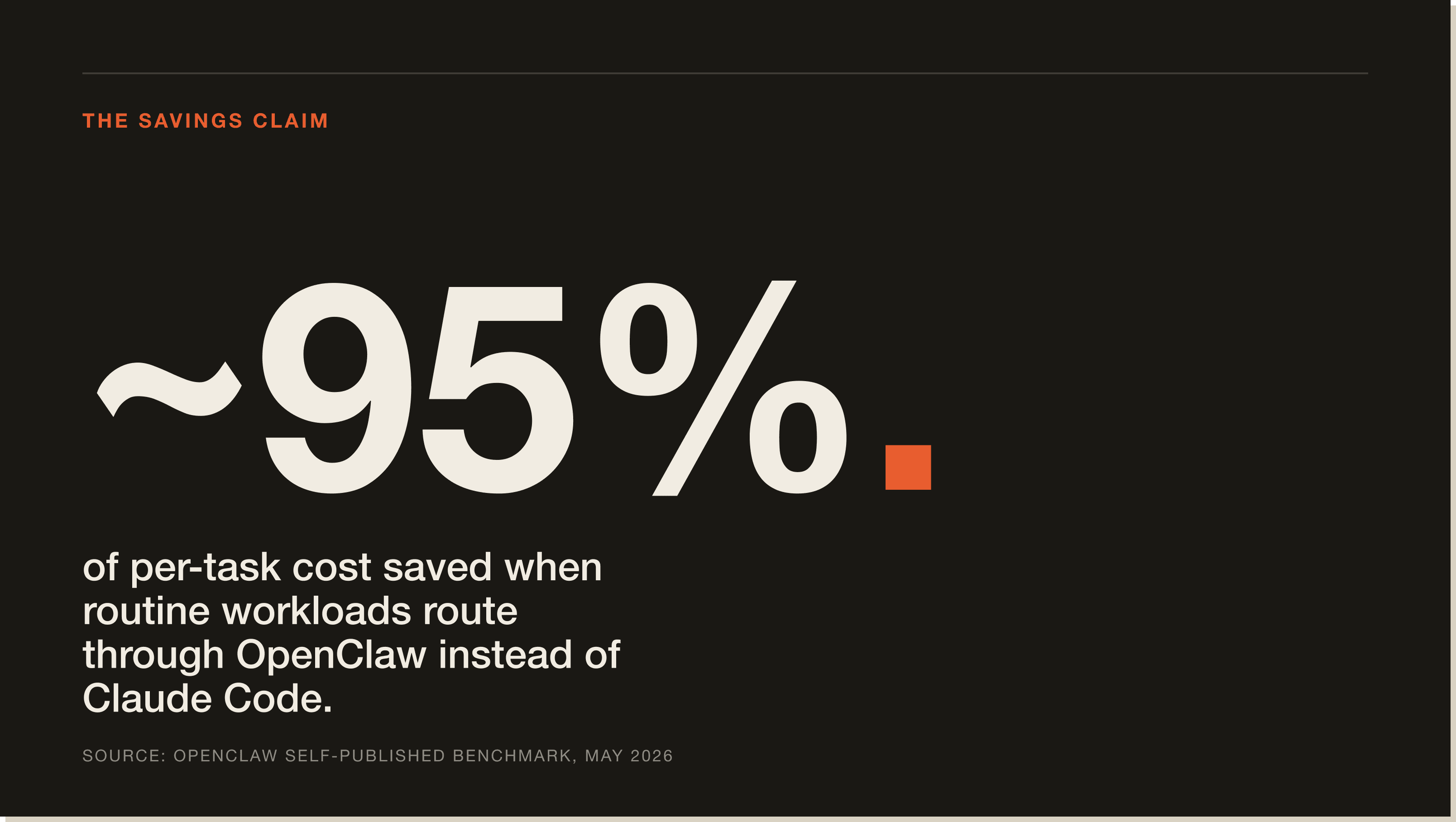
OpenClaw is a free, open-source agent harness for Claude Code that lets you run autonomous AI agents on a VPS or your own machine, controlled through Telegram or WhatsApp. The catch: most people install it, plug in Claude Opus 4.6 as the default, and burn $300 to $600 a month on API credits. One person on Reddit reported $3,600 in a single month. Configured properly, the same setup runs for $6 to $25 a month. A 95% cost reduction on the same tool, same features.
Quick disambiguation. OpenClaw (sometimes written as "open claw" or "open code claude") is an open-source agent harness on GitHub. Not to be confused with Anthropic's Claude Code itself, or with closed-source agent platforms. Nvidia's Jensen Huang called it "the new computer and the most important release of software probably ever." That's the one I'm covering.
I'm Tom. I've been running OpenClaw on a Hostinger VPS for months and I've tested every cost-cutting setting in the docs. This is the exact config I use to keep my bill under $25 a month. Specific models, specific settings, and the techniques that turn OpenClaw into a 95% cheaper Claude Code.
OpenClaw is an open-source AI agent harness that wraps Claude Code (and any other LLM you connect) and gives you a chat interface to run agents from Telegram or WhatsApp. You install it once on a VPS or a Mac Mini, connect it to a model provider, and from there you can spin up agents, schedule them on heartbeats, and have them run tasks like a junior on autopilot.
The pitch is simple. Instead of paying for a managed agent service or running Claude Code manually in a terminal, you self-host OpenClaw, plug in your own API keys, and pay only for the tokens your agents actually burn. Free, open source, and over 9,900 GitHub searches a month tells you the community is paying attention.
OpenClaw has two costs: the hosting (the machine that runs it) and the API spend (the fuel). Every time your agent thinks, replies, checks your email, or runs a heartbeat, it burns tokens against whichever model you've set as default. Most people leave that default on Claude Opus 4.6 and pay premium prices for tasks a 10-cent model could handle.
As I said in the video, "most people are putting premium race fuel in a car that they're driving to the grocery store." That's exactly what's happening. The fix is model routing, context discipline, and search optimisation. OpenClaw supports all three out of the box, you just have to actually turn them on.
Two hidden cost killers run in the background of every OpenClaw install. First, heartbeats. These are recurring triggers that fire on an interval and let your agent check in even when you're not chatting with it. Default settings often set them every 30 minutes, which is overkill for most use cases. Second, context accumulation. Every message in a chat includes all previous messages. By message 50, you're paying for the weight of every conversation stacked on top of each other. That's the single biggest hidden cost most OpenClaw users don't even know is happening.
Open Router is the third-party routing layer that lets OpenClaw call cheap models like MiniMax M2.7, DeepSeek V3.2, and Kimi 2.5 instead of always defaulting to Opus. It also has an auto mode that picks the most cost-effective model based on the complexity of each prompt. That alone is most of the 95% saving.
Claude Code is Anthropic's official terminal coding agent. You run it locally, talk to it from your CLI, and it edits files, runs commands, and ships code. OpenClaw is a layer that wraps Claude Code (or any model) and makes it accessible from a chat interface like Telegram or WhatsApp, with scheduling, heartbeats, and multi-agent support baked in.
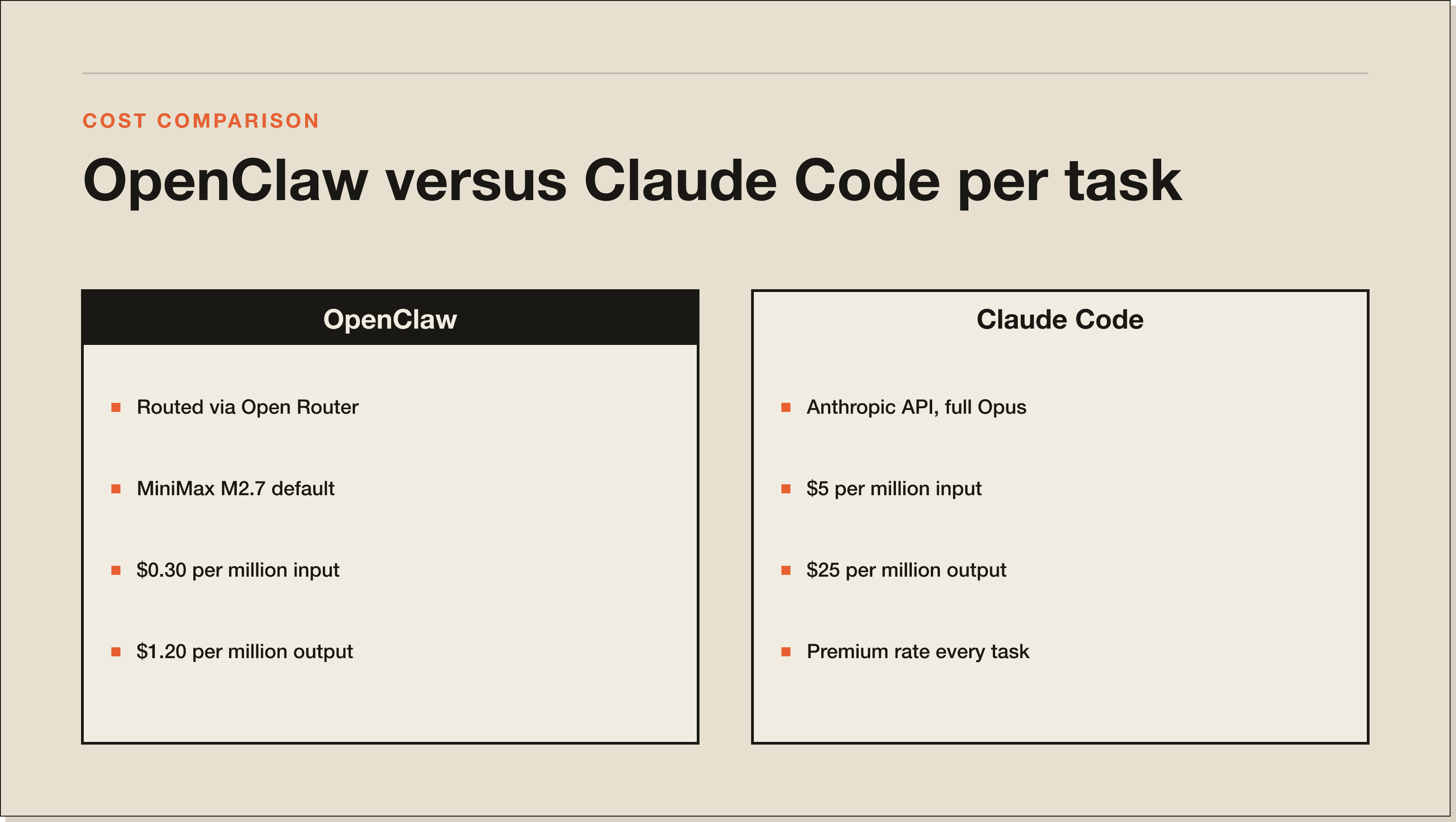
You don't pick one or the other. OpenClaw uses Claude Code (and other models) as its workforce. The difference is who pays. With raw Claude Code on Anthropic's API at full Opus pricing, you're looking at $5 per million input tokens and $25 per million output tokens. Routed through Open Router with MiniMax M2.7, you're at $0.30 per million input and $1.20 per million output. That's a 10x difference on input and 20x on output before you even start optimising heartbeats and context.
A lot of OpenClaw tutorials tell you to buy a Mac Mini for $600 to $800 and run it as your always-on machine. That works, but it's expensive upfront, only runs while the Mac is awake, and you still have to handle security, updates, and backups yourself. A managed VPS at $6 to $9 a month gives you 24/7 uptime, automatic backups, and a hardened security layer. For most people, the VPS path is the cheaper and cleaner OpenClaw setup.
The closest OpenClaw alternative is Paperclip AI, which sits one layer up and orchestrates entire AI teams. Adjacent tools include CrewAI and AutoGen on the Python side, but those are libraries, not chat-first agent harnesses. If you're searching for an open source Claude Code alternative that just works from Telegram, OpenClaw is the closest match.
If you're trying to figure out where OpenClaw sits in the broader stack, my Paperclip AI review walks through the orchestration layer that sits on top of harnesses like OpenClaw. Same mindset, different layer.
I deployed OpenClaw on a Hostinger VPS using their one-click Docker install, then ran a fresh setup from Telegram. The goal: take a default OpenClaw install (running Opus on every action) and squeeze it down using only the settings inside OpenClaw and Open Router. No code changes, no custom builds.
Five levers actually move the bill: Open Router for cheap models, Open Router auto mode for prompt-aware routing, heartbeat optimisation with cron schedules and the cheapest model, regular session compacting, and QMD for low-token markdown search. I'll walk through each one in the install section below. Together they took the same workload from a projected $300 a month to under $25.
Honest take, because anyone who tells you OpenClaw is plug-and-play hasn't actually used it for more than a week.
First, the default settings will drain your wallet. Out of the box, OpenClaw points at premium models, runs heartbeats every 30 minutes, and never compacts context for you. If you don't tune it, the bill grows by message 50.
Second, security is your problem. The default install is reachable from the public internet if you don't lock it down. SSH hardening, firewall rules, and ideally Tailscale to keep access private are all on you. The Hostinger managed install handles a lot of this, but a self-hosted VPS install needs the security pass.
Third, the cheap models aren't free of trade-offs. MiniMax M2.7 and DeepSeek V3.2 are great for heartbeats and simple replies, but you'll feel the drop in capability on heavy reasoning or long coding tasks. The fix is to keep auto mode on for general traffic and manually pin Opus 4.6 for the agent that does your hardest work.
Fourth, dropping API keys into Telegram chat to bootstrap the install is not the most optimal solution, even though it's what most tutorials show. Delete the message after setup, rotate the key, and store secrets in the .env file going forward. This is exactly what I do on a fresh install.
Fifth, and this is important: Anthropic's updated rules say you cannot connect your Anthropic Claude subscription to third-party harnesses like OpenClaw. Use an Anthropic API key, or route everything through Open Router. Don't try to wire your subscription in.
Here's the full OpenClaw install and cost-optimisation walkthrough. I'll assume you already have a basic OpenClaw instance set up and connected to Telegram. If not, follow the official OpenClaw documentation first, then come back for the cost-cutting steps.
From your OpenClaw Telegram chat, ask the bot: "Hey, can you help me set up Open Router? I want to be able to configure different models so we can reduce the cost of using OpenClaw." Drop your Open Router API key in the chat (delete the message after), and tell it to add three specific models: MiniMax M2.7, DeepSeek V3.2, and Kimi 2.5. Once the bot finishes, run the models command and confirm Open Router shows the three new options.
Inside OpenClaw, manually select MiniMax M2.7 as your active model. Send a test prompt and confirm the response includes the model name. If it complains about "think" reasoning depth, set it to medium. This single change moves you from $5 per million input tokens (Opus) to $0.30 per million (MiniMax). A 10x cut before you do anything else.
Open Router has an auto mode that automatically routes each prompt to the cheapest model that can handle it. Coding task? It picks something stronger. Heartbeat check? It picks something dirt cheap. Ask the bot: "Can you set up the Open Router auto mode so that when a prompt comes into OpenClaw it routes to the most cost-effective model based on complexity?" The model ID is openrouter/auto. Once it's added, set it as the new default.
Heartbeats are the silent budget killers. By default they fire every 30 minutes on whatever your default model is. Ask the bot to switch your heartbeats to a cron schedule (twice a day at 9am and 6pm is plenty for most workflows), pin them to MiniMax M2.7 specifically, enable light context mode, set isolated session to true, and set active hours so they only run while you're awake. That alone can knock another 50% off your bill.
Every long Telegram thread sends the entire conversation back to the model on every reply. Use the /compact command at the end of a session and OpenClaw will summarise the conversation and reset the context window. In my test it dropped from 55K tokens to 23K tokens, immediately. Before compacting, ask the bot to save any key decisions or preferences to a memory.md file so nothing important gets lost.
Tell OpenClaw: "Set max output tokens to 248 in the config. This prevents runaway long responses that burn through your output token budget." 248 is aggressive. Adjust to 512 or 1024 if you actually need longer answers. The point is to put a hard ceiling on every reply so a chatty agent can't run away with your wallet.
QMD (Quick Markdown) is a local search engine for your markdown notes. It turns your files into mini vectors with reranking, so when an agent needs to look something up it runs a cheap search instead of stuffing every file into context. Ask OpenClaw: "Hey, can you install QMD from this GitHub repo?" Then tell it: "Add the QMD agent integration to the agents.md file so it runs the QMD search before answering anything about prior work, decisions, dates, people, preferences, or to-dos." Once it's wired in, every "do you remember when..." question gets answered for pennies.
Yes, with one condition. OpenClaw is worth it if you're willing to spend an afternoon tuning it. Out of the box it'll bleed money. Tuned, it's the cheapest way to run autonomous agents on Claude Code's capability without paying full Anthropic API rates.
Who OpenClaw is for: builders who already understand prompts, want chat-first access to agents from Telegram or WhatsApp, and care about controlling costs. Who it's not for: complete beginners who've never opened a terminal, or people who want a polished SaaS dashboard with a billing graph. OpenClaw is open source, which means powerful and a little rough.
My honest take: if you're spending hundreds of dollars a week on OpenClaw and you're not building anything that either saves you money or makes you more money, you're using the tool wrong. The people winning with AI automation are the ones who learn to build workflows that solve expensive problems. OpenClaw is a great fit when you've already got that mindset.
For a real example of what optimised AI workflows look like in production, this case study with Keven Elison walks through how he stitched together n8n, RAG, and MCP servers to run a real B2B marketing operation. Same cost-discipline mindset, applied to a different stack.
OpenClaw is a free, open-source AI agent harness that wraps Claude Code and other LLMs and gives you a chat interface (typically Telegram or WhatsApp) to control agents from. You self-host it on a VPS or Mac Mini, plug in your own API keys, and only pay for the tokens your agents burn.
OpenClaw runs as a Docker app on your hardware. You connect a model provider (Anthropic, Open Router, or any compatible API), define agents, set heartbeats and routines, and chat with them from Telegram or WhatsApp. Every prompt goes from chat, through OpenClaw, to whichever model you've selected, and the reply comes back to your chat window.
Yes, OpenClaw the software is free and open source on GitHub. You pay for two things on top: the hosting (a VPS like Hostinger starts at around $6 to $9 a month, or you can run it on a Mac Mini you already own) and the LLM tokens. With the cost-cutting setup in this guide, total monthly cost runs $6 to $25 instead of the $300 to $600 most unoptimised installs hit.
The fastest path is a Hostinger VPS with the OpenClaw Docker template, or their managed OpenClaw instance which is one-click. After deploy, log in, drop your Open Router API key in, and follow the seven steps above to add cheap models, switch the default, enable auto mode, optimise heartbeats, set max tokens, install QMD, and lock down security.
They're not competitors. Claude Code is Anthropic's official terminal coding agent. OpenClaw is a chat-first harness that can use Claude Code as one of its model adapters. Use Claude Code directly if you want a terminal coding tool. Use OpenClaw if you want chat-controlled agents from your phone, with scheduling, heartbeats, and cheaper model routing built in.
Three reasons. You're using Claude Opus 4.6 as the default for every action including simple heartbeats. Your context window is full and you've never run /compact, so every reply re-sends the entire conversation. Your heartbeats run every 30 minutes 24/7. Fix all three with Open Router auto mode, regular compacting, and a cron-scheduled heartbeat on a cheap model. That's the 95% saving.
Yes, but it's not the cheapest option. A Mac Mini costs $600 to $800 upfront and only runs while it's awake and online. A VPS at $6 to $9 a month gives you 24/7 uptime, automatic backups, and security hardening. Unless you already own the Mac Mini, the VPS path is the better OpenClaw setup.
It's as safe as the security around it. Don't paste API keys into Telegram chat permanently (delete the bootstrap message after setup), keep secrets in the .env file, harden the VPS with SSH key auth and a firewall, and consider Tailscale so the instance is only reachable when you're connected. The managed Hostinger OpenClaw template handles most of this for you.
If this guide was useful, these go deeper on adjacent topics:
Primary sources referenced in this guide:
OpenClaw is a tool. The skill is knowing what to build with it. If you want to go deeper than "I installed an agent harness" and actually build production-ready AI systems for your business, the 30-Day Claude Code Challenge walks you through an interactive Claude Code course inside Claude Code. You'll build your first web app and your first automation in 30 days.
Not ready for the challenge yet? Grab the free Claude Code Blueprint. It's the foundation OpenClaw sits on top of, so going through the Blueprint first will make every OpenClaw workflow you build hit harder.
OpenClaw is a free, open-source AI agent harness that wraps Claude Code (and any other LLM you connect) and gives you a chat interface to run agents from Telegram or WhatsApp. You self-host on a VPS or Mac Mini, plug in your own API keys, and only pay for the tokens your agents actually burn. Nvidia's Jensen Huang called it 'the new computer and the most important release of software probably ever.'
Five levers. Route through Open Router to swap Opus 4.6 for MiniMax M2.7 ($0.30 input vs $5 input per million tokens). Use Open Router auto mode so each prompt routes to the cheapest model that can handle it. Drop heartbeats from every 30 minutes to a cron schedule pinned to MiniMax. Run /compact regularly to stop the entire conversation re-sending on every reply (in my test, 55K tokens to 23K immediately). Add QMD so memory queries hit a cheap local search instead of stuffing files into context.
Three reasons, almost every time. You are using Claude Opus 4.6 as the default for every action, including simple heartbeats. Your context is full and you have never run /compact, so every reply re-sends the entire conversation. Your heartbeats fire every 30 minutes, 24/7. One person on Reddit reported $3,600 in a single month from exactly this setup. Fix all three with Open Router auto mode, regular compacting, and a cron-scheduled heartbeat on a cheap model.
The software is free and open source on GitHub. You pay for two things: the hosting (a Hostinger VPS starts around $6 to $9 a month, or run it on a Mac Mini you already own) and the LLM tokens. With the cost-cutting setup in the guide, total monthly cost runs $6 to $25. Without it, most unoptimised installs land at $300 to $600 a month.
No. Anthropic's updated rules say you cannot connect your Anthropic Claude subscription to third-party harnesses like OpenClaw or Paperclip AI. Use an Anthropic API key, or route everything through Open Router. Trying to wire your subscription in risks getting your account flagged.
It is as safe as the security around it. Do not paste API keys into Telegram chat permanently. Delete the bootstrap message after setup. Keep secrets in the .env file. Harden the VPS with SSH key auth and a firewall. Use Tailscale so the instance is only reachable when you are connected. The managed Hostinger OpenClaw template handles most of this for you out of the box.
Complete beginners who have never opened a terminal, and anyone expecting a polished SaaS dashboard with a billing graph. OpenClaw is open source, which means powerful and a little rough. The default settings will drain your wallet if you do not tune them. If you are spending hundreds a week on OpenClaw and not building anything that saves you or makes you money, you are using the tool wrong. Get comfortable with Claude Code first.
Five interactive lessons. Install Claude Code, build your first automation, and deploy it live on the internet — all in under an hour. Free, no coding required.
Grab the Blueprint →