← Back to Blog
How to Install Claude Code on Mac, Windows, Linux + WSL.
Step-by-step Claude Code install guide for Mac, Windows, Linux, and WSL. Exact commands, prerequisites, troubleshooting, update and uninstall paths.
Step-by-step Claude Code install guide for Mac, Windows, Linux, and WSL. Exact commands, prerequisites, troubleshooting, update and uninstall paths.
To install Claude Code, run npm install -g @anthropic-ai/claude-code in your terminal (you'll need Node.js 18 or higher), or use Anthropic's native installer at claude.ai/install.sh on macOS and Linux, or claude.ai/install.ps1 in Windows PowerShell. Then run claude in any project folder and log in with your Anthropic account.

I'm Tom. I've installed Claude Code on five machines across Mac, Windows, WSL, and a Linux VPS, and I run it inside a desktop app, the terminal, VS Code, and on the web. Below is the full step-by-step install for every OS, the exact commands, the prerequisites people skip, the update and uninstall paths, and the four errors that trip people up most often.
Claude Code needs three things before the install command will work. Get these in place first or you'll burn an hour on errors that look like the install is broken when it isn't.
Sign in with an Anthropic account on the Claude Pro or Max plan for the all-in-one subscription. Pro is $20/month and includes Claude Code on Sonnet. Max 5x ($100/month) and Max 20x ($200/month) raise the weekly limits and unlock Opus access. If you'd rather pay per token, generate an API key at console.anthropic.com instead. You'll wire it up after install with the /login command.
If you install Claude Code via npm (the cross-platform path), you need Node.js 18 LTS or newer on your machine. Node 20 or 22 is the safer bet because some MCP servers expect newer engines. Check what you have with node --version. If it returns nothing or a version below 18, install the latest LTS from nodejs.org first.
Claude Code is a CLI first. On Mac you'll use Terminal or iTerm. On Windows you'll use PowerShell, Windows Terminal, or WSL. On Linux you'll use whatever shell you already run. The desktop app and IDE plugins all wrap the same CLI underneath, so getting comfortable with one terminal pays off for the rest.
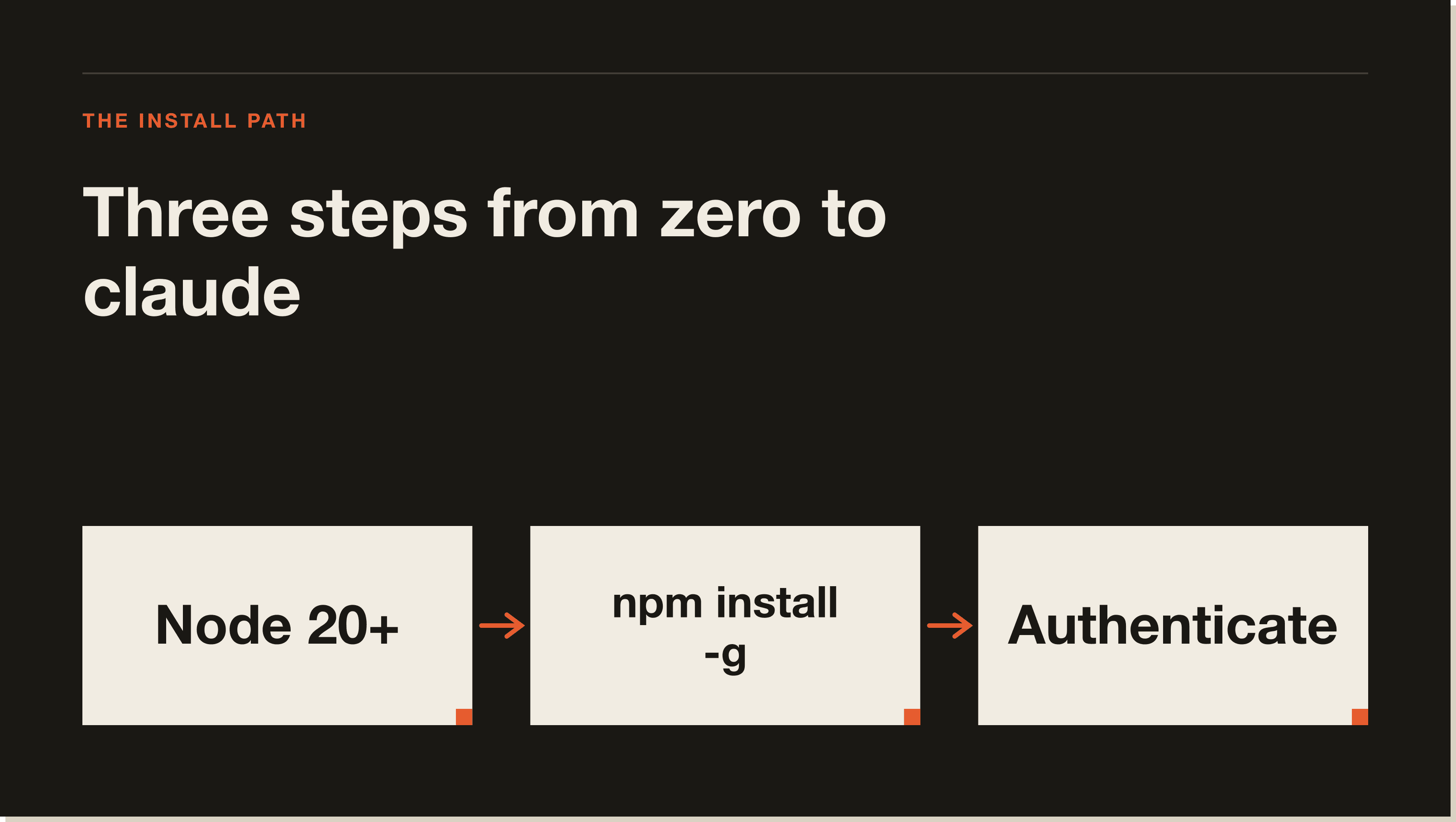
On Mac you have three install paths: the npm install (works on any version of macOS with Node), the Anthropic native installer, or Homebrew. The npm path is the most common because it gives you the same command across every OS. I'll walk all three but start with npm.
Download the macOS installer from nodejs.org and pick the LTS build. Run the .pkg file, follow the prompts, then open Terminal and confirm the version with node --version. Anything 18 or higher is fine. If you already use Homebrew, brew install node works too.
In your terminal, paste this and hit return:
npm install -g @anthropic-ai/claude-code
The -g flag installs Claude Code globally so you can run claude from any folder. The package name is @anthropic-ai/claude-code, not claude-code. Wrong package = wrong tool. The official package shows the @anthropic-ai scope on npmjs.com.
Run claude --version. You should see a version number like 2.1.x. Then change into any project folder and run claude. The first time you run it, you'll be prompted to log in. Pick "Claude account" if you have a Pro or Max subscription, or paste your API key. Then ask Claude something simple like "what files are in this folder?" to confirm it works.
If you'd rather skip Node, Anthropic's native installer is a single command: curl -fsSL https://claude.ai/install.sh | bash. Or with Homebrew, run brew install --cask claude-code. The native install auto-updates in the background. Homebrew does not, so you have to brew upgrade manually.
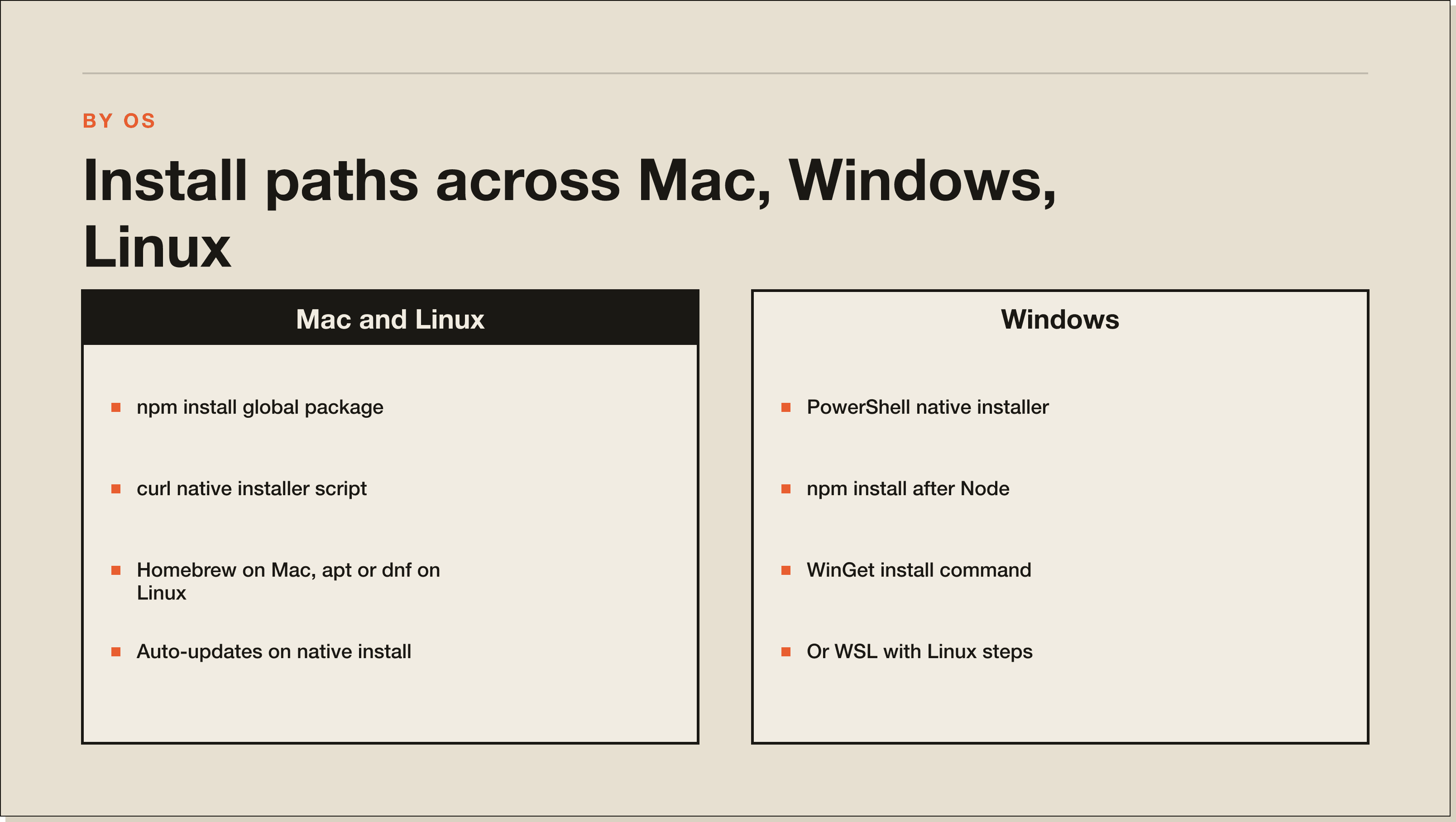
On Windows you have three options: a clean PowerShell native install, npm via Node.js for Windows, or WSL (Windows Subsystem for Linux). I'd default to PowerShell for the simplest setup, and WSL only if you're already running a Linux dev environment. The PowerShell native installer was added so Claude Code Windows users can avoid Node entirely.
If you want the npm install path, download the Node.js LTS installer for Windows from nodejs.org. Run the .msi file and accept the defaults. Open a fresh PowerShell window and run node --version to confirm. If it returns a version, you're set.
Two options. PowerShell native (no Node needed):
irm https://claude.ai/install.ps1 | iex
Or via npm (after installing Node):
npm install -g @anthropic-ai/claude-code
Or via WinGet:
winget install Anthropic.ClaudeCode
Open a new PowerShell window so PATH refreshes. Run claude --version. Then run claude in any folder and follow the login prompt. If PowerShell can't find claude after install, close and reopen the window. Claude Code adds itself to PATH but the existing window won't see it until restart.
On Linux the npm install command is identical to Mac. The native installer works the same way. Most distros (Debian, Ubuntu, Fedora, RHEL, Alpine) have apt or dnf packages too. Pick whichever matches how you manage everything else on your box.
On Debian or Ubuntu:
curl -fsSL https://deb.nodesource.com/setup_20.x | sudo -E bash - && sudo apt-get install -y nodejs
On Fedora or RHEL:
sudo dnf install -y nodejs npm
Confirm with node --version. You want 18 or higher.
npm path:
npm install -g @anthropic-ai/claude-code
Or the Anthropic native installer (recommended for VPS deployments because it auto-updates):
curl -fsSL https://claude.ai/install.sh | bash
Run claude --version. Then claude in your project. Log in via /login the same way as the other platforms. On a headless VPS, the login flow gives you a URL you copy into your local browser, complete the auth, then paste the token back into the SSH session.
Claude Code with WSL is a clean way to run it on Windows without leaving a Linux dev environment. Open Ubuntu (or whichever distro you've installed under WSL2), then follow the Linux install steps above. The npm install command is the same. The login flow opens a URL in your Windows browser even though you're running inside WSL, so it just works.
One gotcha: install Node and Claude Code inside the WSL distro, not on Windows. If you mix the two, claude will run in PowerShell against your Windows file paths but expect Linux paths. Pick a side. I run everything inside Ubuntu under WSL2 and it's been the smoothest setup of all four.
The Claude Code desktop app is a separate download for Mac and Windows that wraps the same CLI in a native app window. Get it from claude.ai/download. Run the installer, log in with your Anthropic account, open a folder, and you're in. The desktop app pulls the same skills, MCP servers, and CLAUDE.md files as the terminal version, so a project you set up in one shows up in the other.
If you're new and you don't yet care about the terminal, the desktop app is the gentlest entry. The 30-Day Challenge students start there because the file tree, the chat, and the model picker are all visible in one window. You can drop into the terminal later when you want it.
If you installed via the Anthropic native installer or the desktop app, Claude Code updates itself automatically in the background. You don't need to do anything. The CLI tells you when a new version is available and prompts a restart.
If you installed via npm, run:
npm update -g @anthropic-ai/claude-code
Or to force the latest:
npm install -g @anthropic-ai/claude-code@latest
If you used Homebrew on Mac, run brew upgrade claude-code. WinGet on Windows: winget upgrade Anthropic.ClaudeCode. Check your installed version anytime with claude --version. The current changelog lives on the Claude Code GitHub repo.
To uninstall Claude Code from npm, run npm uninstall -g @anthropic-ai/claude-code. From Homebrew, brew uninstall --cask claude-code. From WinGet, winget uninstall Anthropic.ClaudeCode. The desktop app uninstalls like any other app: drag it to the Trash on Mac or use Add/Remove Programs on Windows.
Your config and project memory live in ~/.claude on Mac and Linux, or %USERPROFILE%\.claude on Windows. Delete that folder if you want a completely clean slate. Otherwise leave it in place and your skills, CLAUDE.md files, and Auto Memory survive a reinstall.
Four problems cover 90% of failed installs. Run through them in order before you go hunting on Reddit.
If npm install throws errors about engines, syntax, or unsupported features, your Node is too old. Run node --version. If it's below 18, update Node to LTS (20 or 22) and try again. nvm makes this trivial: nvm install --lts then nvm use --lts.
On Mac and Linux, if npm install -g throws EACCES errors, npm is trying to write to /usr/local without permission. Don't fix this with sudo. Instead, set npm's global prefix to a folder you own:
mkdir -p ~/.npm-global && npm config set prefix '~/.npm-global'
Then add ~/.npm-global/bin to your PATH in ~/.zshrc or ~/.bashrc. Restart your shell. Re-run the install. This is also the safest fix long-term because you stop polluting system directories.
If install completes but claude --version returns "command not found" or "zsh: command not found: claude" (yes, that's a real top-search query), your shell hasn't picked up the new binary. Close and reopen your terminal. If it still doesn't work, check that npm's bin folder is in your PATH. Run npm bin -g to find it. On Windows, restart PowerShell. On WSL, source ~/.bashrc.
If the PowerShell native installer stalls, you're behind a corporate proxy that's blocking the script. Use the npm install path instead with explicit registry: npm install -g @anthropic-ai/claude-code --registry https://registry.npmjs.org/. If npm is also blocked, install via WinGet, which uses the Microsoft Store backend most enterprise networks already permit.
Once claude --version runs cleanly and you're logged in, the next step is to actually build something with it. The path I send everyone down is the Claude Code Blueprint. It's a free 60-minute interactive lesson that runs inside Claude Code itself. You open the folder, type "start lesson 1", and it walks you through your first CLAUDE.md, your first slash command, your first skill, and your first MCP integration. By the end you have a working Brief Generator that researches a company in 60 seconds.
If you want to go further into production-grade systems, the 30-Day Challenge is the cohort version. Same starting point, but you ship five projects across the month with weekly live calls. Either way, the install is just the gate. The skill comes from building.
If you install Claude Code via npm (npm install -g @anthropic-ai/claude-code), yes, you need Node.js 18 or higher. If you use the Anthropic native installer (curl https://claude.ai/install.sh | bash on Mac/Linux, irm https://claude.ai/install.ps1 | iex on Windows), Homebrew, or WinGet, you don't need Node. The native installers ship a self-contained binary.
Installing Claude Code is free. The CLI itself doesn't cost anything to download. You pay for the model behind it: a Claude Pro subscription ($20/month) includes Claude Code on Sonnet, Max 5x ($100/month) adds Opus, or you can pay per token via the Anthropic API.
Install Claude Code on the command line first (any of the methods above). Then open VS Code, search the Marketplace for "Claude Code", and install the official Anthropic extension. The extension wraps the same CLI inside the editor sidebar, so your skills and CLAUDE.md files work the same. JetBrains IDEs have an equivalent plugin in the JetBrains Marketplace.
The CLI runs in your terminal. The desktop app is a native Mac or Windows app that wraps the same CLI in a chat-style window with a file tree. Both pull from the same project folders, the same skills, the same MCP config, and the same Auto Memory. Pick whichever feels better. Most people use the desktop app for greenfield projects and the CLI for repos they're already SSH'd into.
Yes. Install Node.js 18+ via apt or NodeSource, then run npm install -g @anthropic-ai/claude-code. Or use Anthropic's native installer with curl -fsSL https://claude.ai/install.sh | bash. Both work cleanly on Ubuntu 20.04, 22.04, and 24.04. Same path works on Debian, Fedora, RHEL, and Alpine.
Pin a version with npm: npm install -g @anthropic-ai/claude-code@2.1.119 swaps the @latest tag for the version you want. Useful if you're testing a regression or a CHANGELOG note pinned to a release. List versions with npm view @anthropic-ai/claude-code versions.
Yes, and it's how I run a lot of production work. SSH into the box, install Node, run the npm install command, then run claude. The login flow gives you a URL you open in your local browser, finish auth, and paste the token back into the SSH session. Lock the VPS down with Tailscale or SSH keys before you put real workloads on it.
If you used the native installer or desktop app, it auto-updates. For npm: npm install -g @anthropic-ai/claude-code@latest. For Homebrew: brew upgrade claude-code. For WinGet: winget upgrade Anthropic.ClaudeCode. Check the running version with claude --version.
No. Claude Code is a frontend to Anthropic's models, so it needs an internet connection to send each prompt and receive each response. The CLI binary runs locally and the file edits happen on your machine, but the reasoning step is all cloud.
The install is the easy part. The build is where the value lives. Grab the free Claude Code Blueprint and you'll be running your first real automation 60 minutes from now. It's the same starting point I use with every new student, every new team I install Claude Code for, and every new VPS I spin up.
If you want a deeper read on what Claude Code can actually do once it's installed, this breakdown of the upgrades that made Claude Code 10x more powerful covers the changes between v1 and v2 and what they unlock.
Run npm install -g @anthropic-ai/claude-code in your terminal (you need Node.js 18 or higher), or use Anthropic's native installer at claude.ai/install.sh on Mac and Linux or claude.ai/install.ps1 in Windows PowerShell. Then run claude in any project folder and log in. The same install path works on Mac, Windows, Linux, and WSL.
Only if you install via npm. If you use the Anthropic native installer (curl https://claude.ai/install.sh | bash on Mac/Linux, irm https://claude.ai/install.ps1 | iex on Windows), Homebrew, or WinGet, you do not need Node. Those ship a self-contained binary. The npm path is the most common because it gives you the same command across every OS.
The CLI itself is free to download. You pay for the model behind it. Claude Pro at $20 a month (or $17 annual) includes Claude Code on Sonnet. Max 5x at $100 adds Opus access. Max 20x at $200 unlocks the highest effort tier. You can also bring your own API key and pay per token through console.anthropic.com.
Yes. The PowerShell native installer was added so Windows users can avoid Node entirely. Run irm https://claude.ai/install.ps1 | iex in a fresh PowerShell window. WinGet also works (winget install Anthropic.ClaudeCode) and is often the cleanest path on corporate networks that block other installers. Open a new PowerShell window after install so PATH refreshes.
On Mac and Linux, npm install -g often throws EACCES errors because npm is trying to write to /usr/local without permission. Do not fix this with sudo. Set npm's global prefix to a folder you own with mkdir -p ~/.npm-global && npm config set prefix '~/.npm-global'. Add ~/.npm-global/bin to your PATH in ~/.zshrc or ~/.bashrc, restart your shell, and re-run the install.
If you used the Anthropic native installer or the desktop app, it auto-updates in the background. For npm, run npm install -g @anthropic-ai/claude-code@latest. Homebrew on Mac: brew upgrade claude-code. WinGet on Windows: winget upgrade Anthropic.ClaudeCode. Check the running version anytime with claude --version.
Yes, and it is how a lot of production work gets done. SSH into the box, install Node, run npm install -g @anthropic-ai/claude-code, then run claude. The login flow gives you a URL you open in your local browser, finish auth, and paste the token back into the SSH session. Lock the VPS down with Tailscale or SSH keys before you put real workloads on it.
Five interactive lessons. Install Claude Code, build your first automation, and deploy it live on the internet — all in under an hour. Free, no coding required.
Grab the Blueprint →