13 AI automation examples for small business, with the hours three real builds saved.
13 AI automation examples for small business, with what triggers each one and what the AI does, plus three real builds with the hours counted before and after.
The first 13 are the common ones. The last three are builds I did or coached, with the time each one saved.
Common AI automation examples for small businesses are lead qualification, email drafting and marketing content. Ten more are in the table below, with what triggers each one and what the AI does.
In this guide:
✓The 13 examples, with what sets each one off
✓The results businesses report, and whose results they are
✓Three builds and the time each one saved
✓What to automate first, and what fails
What are examples of AI automations?.
Examples of AI automations are lead qualification, email drafting, content drafting, inbox triage and scheduled reports. The table has all 13, with the most common first.
Example
What triggers it
What the AI does
Lead qualification and routing
A new form, email or enquiry
Reads the enquiry, scores the lead, updates the CRM and sends it to the right person
Email and message drafting
An incoming email, a finished call, or a quote with no reply
Writes a draft reply or follow-up for a person to review and send
Marketing and social content
A new blog post, product photo or long article
Writes posts for each platform and queues them for approval
Inbox and support ticket triage
A new email or ticket
Tags the topic and urgency, sets priority and routes it
Scheduled reports
A weekly or monthly schedule
Pulls numbers from ads, logs or analytics and writes a short summary
Meeting and call summaries
A call ends and a transcript exists
Lists decisions and action items and logs notes to the CRM
Call prep briefs
A meeting is booked with someone outside the company
Gathers CRM history, recent emails and company facts into one page
Staff questions
A team member asks where something is
Finds the answer in policies, email threads and notes
Expense and receipt processing
An emailed receipt or a phone photo
Reads vendor, amount and date, then sets the category in the accounts
Invoicing and payment reminders
An invoice falls due
Sends the invoice and reminds the client
Appointment booking and reminders
A customer books or asks for a time
Collects details, confirms, reminds and flags double bookings
Hiring admin
Applications arrive
Ranks CVs against the job, sends screening questions and starts onboarding
Customer feedback summaries
New reviews, surveys or tickets
Finds the themes that repeat and writes them up
Eight more are worth a look once the first one works. They are lead research, customer FAQ chatbots, missed-call triage, long document summaries, IT help desk requests, payroll, stock forecasting and team alerts.
None of these is a product you buy. Each one gets built around the tools your team already uses, with Claude Code or Codex.
What results do these automations get?.
Most published results come from large companies, or from the customers of the software vendor who published them. Keep that in mind if you run a team of 12.
Example
Result
Whose result
Lead routing and call notes
"15 minutes saved per call"
Vendasta
Support ticket triage
"reduced resolution time by 69%"
BioRender
Call prep briefs
"cutting prep from 45 minutes to a quick review"
Viva
Staff questions
"employees saved over 16,000 hours each month"
Amadeus, a company with more than 16,000 employees
Numbers from a company with 16,000 staff don't tell you much about yours. So I've added three smaller builds and the time each one saved.
Three real builds and the time each one saved.
These are builds I did or coached, and each one is on my site with the client's name on it. Five of my own builds are in a separate post, Claude Code use case examples.
Exam results filing: 5 hours down to one upload.
Sanjeev runs Exam Centre Birmingham, with 600 to 800 candidates at peak across four exam boards. Splitting one 500-result exam-board file into candidate folders took his team about 5 hours by hand.
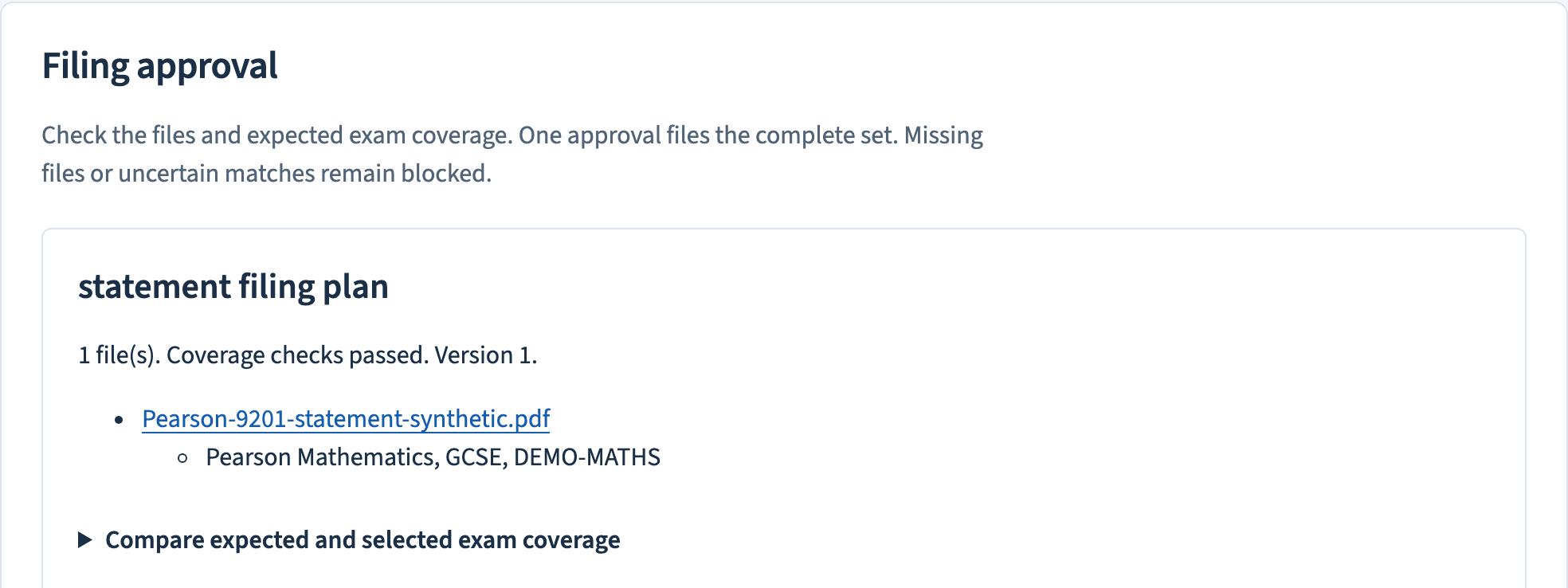
I built the system that replaced it. Staff upload the exam-board PDF once, the system reads every page and matches it to the right candidate, and nothing is filed until a staff member approves the set. Four boards send a file every series, so that's roughly 20 hours of filing per series by my estimate.
The exam centre system holds every filing until a staff member approves the full set.
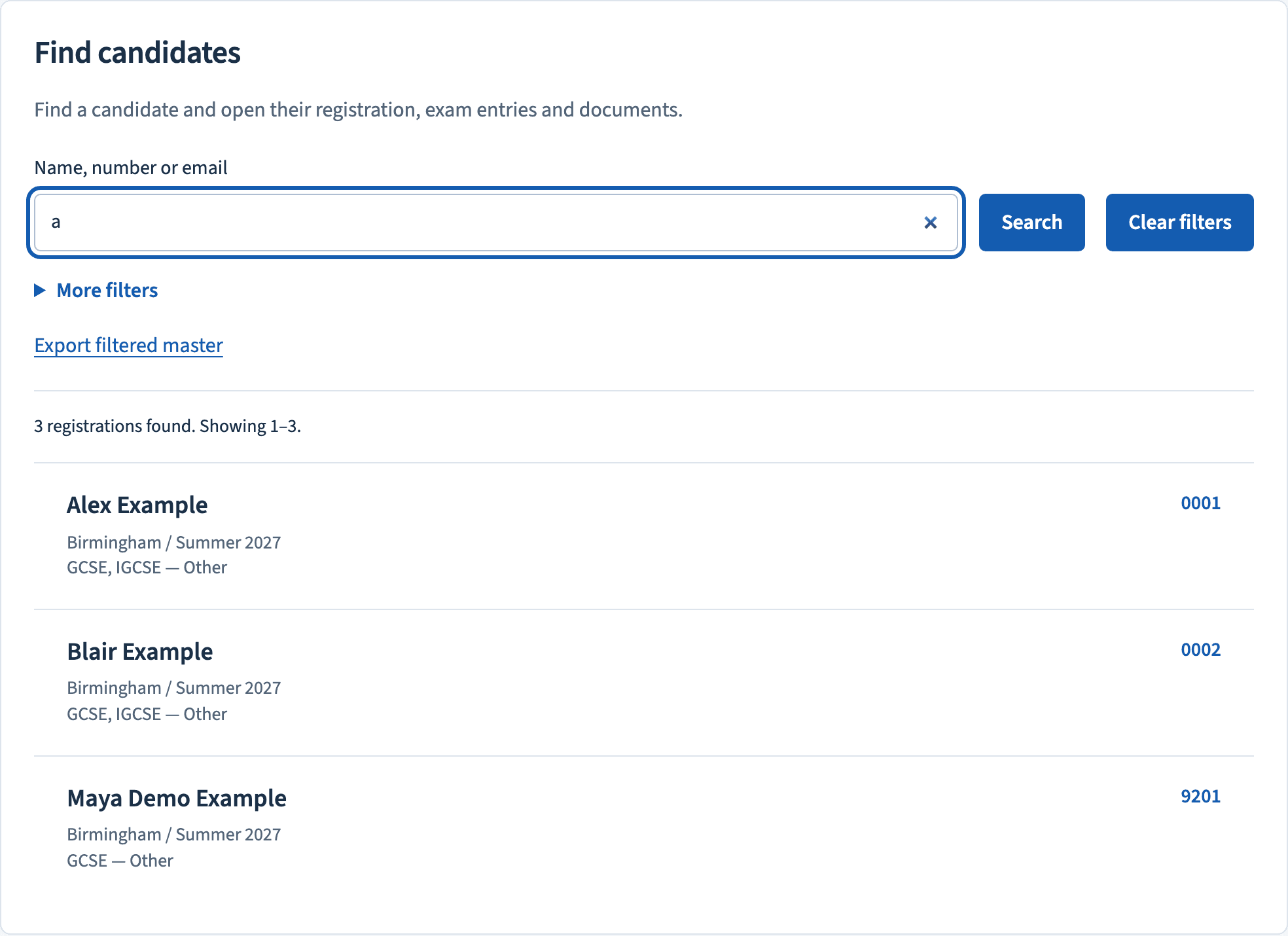
Staff find any candidate by name, centre, series or candidate number.
Civil engineering data entry: days down to minutes.
Chris Cole owns a civil engineering business and built his own workflows with my coaching. "Manual entry would take days," he says. "Now it runs in the background in minutes."
He had no coding background when he started. He has since cancelled Adobe Creative Cloud, because Claude and Codex now produce his proposals. His case study walks through what he built.
Chris Cole went from days of manual entry to minutes.
Manufacturing admin: 4 to 5 hours a day back.
Kyle Rucker is Operations Lead at SMSI Group, a manufacturer with 150+ staff. His team built their systems with my coaching, and one admin got 4 to 5 hours a day back.
"We've taken three brilliant people off manual, low-level work and freed them up for high-level work," he says. The rest is in his case study.
Kyle Rucker, Operations Lead at SMSI Group.
The first two aren't on the list of 13. They're document and data entry jobs, and those are the ones businesses on Reddit talk about most.
What businesses on Reddit say they use.
A Reddit thread with more than 120 replies asked what AI automations businesses are really using right now. The most upvoted answer on r/automation says the boring internal jobs win.
the automations i see working best are the boring internal ones. [...] stuff that saves 10+ hours a week per person but doesn't look impressive in a pitch deck.
Reply after reply makes the same point. These are the jobs they name, with the most common first:
✓Support ticket and inbox triage
✓Lead qualification and follow-up
✓Document processing and data entry
✓Meeting notes turned into tasks
✓Scheduled reports
✓First drafts of content
One reply calls document processing and data entry "the most automated I've seen". The exam results build and Chris Cole's data entry are both that kind of job.
One reply gives a number. The commenter's system pulls CRM, billing and ticket history before a person opens the request, and "that step alone cut per-request time from 15 min to 3".
One reply is from a small local business owner whose team took "like a day or more" to call customers back. A consultant built a system to contact them right away, and the owner's verdict so far is "Results yet to be seen but directionally so far it seems to be working".
Some of the replies come from people who sell automation tools. Weigh them with that in mind.
What Reddit says fails.
A second thread on r/Entrepreneur asks what worked and what didn't. AI sales agents come up as the clearest failure, because "there is a loss of trust, especially in B2B/high ticket clients".
Another reply sums up where customers draw the line: "Customers don't mind AI for convenience (ordering, tracking, FAQs) but want humans for decisions". Set-and-forget workflows get the same verdict, because one "always drifts or breaks in weird edge cases".
One commenter makes the cost point: "Sometimes the setup/maintenance cost of automation exceeds just doing it manually, especially for low-frequency tasks". And the most upvoted reply in that thread is a sceptic who says "Right now all it seems like is a way to sell courses to automate everything".
What are some good automations for small businesses to start with?.
Good first automations for a small business are repetitive, follow the same steps every time and are easy for a person to check. Lead capture, appointment confirmations, invoice processing and support ticket routing all fit.
Start with one and expand after it works. GoDaddy puts it as "Start with one workflow, measure the time saved, and build from there."
My own test is hours. Count what the job costs your team in a week, and start with the biggest number that has clear steps.
Which AI automations fail?.
The automation that fails most is the one that tries to cover the whole business at once.
A broken or undocumented process stays broken after you automate it. GoDaddy's line is "Automating an inefficient process only helps it run faster, not better."
Some work should never be fully handed over: hiring decisions, legal and compliance reviews, and business strategy. Keep a person in the loop before anything goes to a customer.
Not every step needs AI. Where the steps never change, plain automation is cheaper and easier to keep running.
What does one of these automations cost?.
Building one yourself with Claude Code costs about $20 a month for the subscription, plus your own hours. Having one built for you as a custom system costs from $10,000.
Questions owners ask about AI automation examples.
Do these AI automation examples need code?
They run on code, and you don't have to write it. With Claude Code you describe the job in plain English and it writes the software. The exam centre build runs on code deployed on the centre's own Vercel account.
Should AI send emails to customers without a person checking?
No, let the AI write the draft and have a person send it. One rule worth copying: "I let AI write the email. I never let it hit send."
How much time does AI automation save a small business?
It depends on the job. The published figures run from 2 to 8 hours a week per workflow, and those come without a source. Count your own hours before and after, the way the three builds above did.
Can AI automation handle hiring?
It can handle the admin. Use it to sort applications and book interviews, and keep the hiring decision with a person.
Which example should a small business automate first?
Start with the job that takes the most hours and follows the same steps each time. Lead capture, appointment confirmations, invoice processing and support ticket routing are the usual candidates. A job that costs about 4 hours a week is one to build yourself, and a done-for-you build pays back fastest at 10 hours a week or more.
If you'd rather have one of these built and running on your own accounts, that's my AI consulting service.
Free · 60 Minutes · No coding required
The Claude Code Blueprint.
Five interactive lessons. Install Claude Code, build your first automation, and deploy it live on the internet — all in under an hour. Free, no coding required.