Blender MCP: Control Blender With Claude (Setup + Real Examples).
Blender MCP connects Blender 3D to Claude via the Model Context Protocol. You describe what you want in plain English and Claude creates, modifies, and scripts objects in Blender directly.
Blender MCP connects Blender 3D to Claude through the Model Context Protocol. You describe a scene in plain English and Claude creates the objects, applies the materials, and runs the Python directly inside Blender. No separate script file. No copy-pasting into the Python console.
The project is by Ahuja Siddharth and lives on GitHub at ahujasid/blender-mcp. It works with Claude Desktop, Cursor, and VS Code.
I'm Tom. I teach operators how to build with Claude Code, and Blender MCP is one of the more impressive demonstrations of what MCP servers make possible with creative tools.
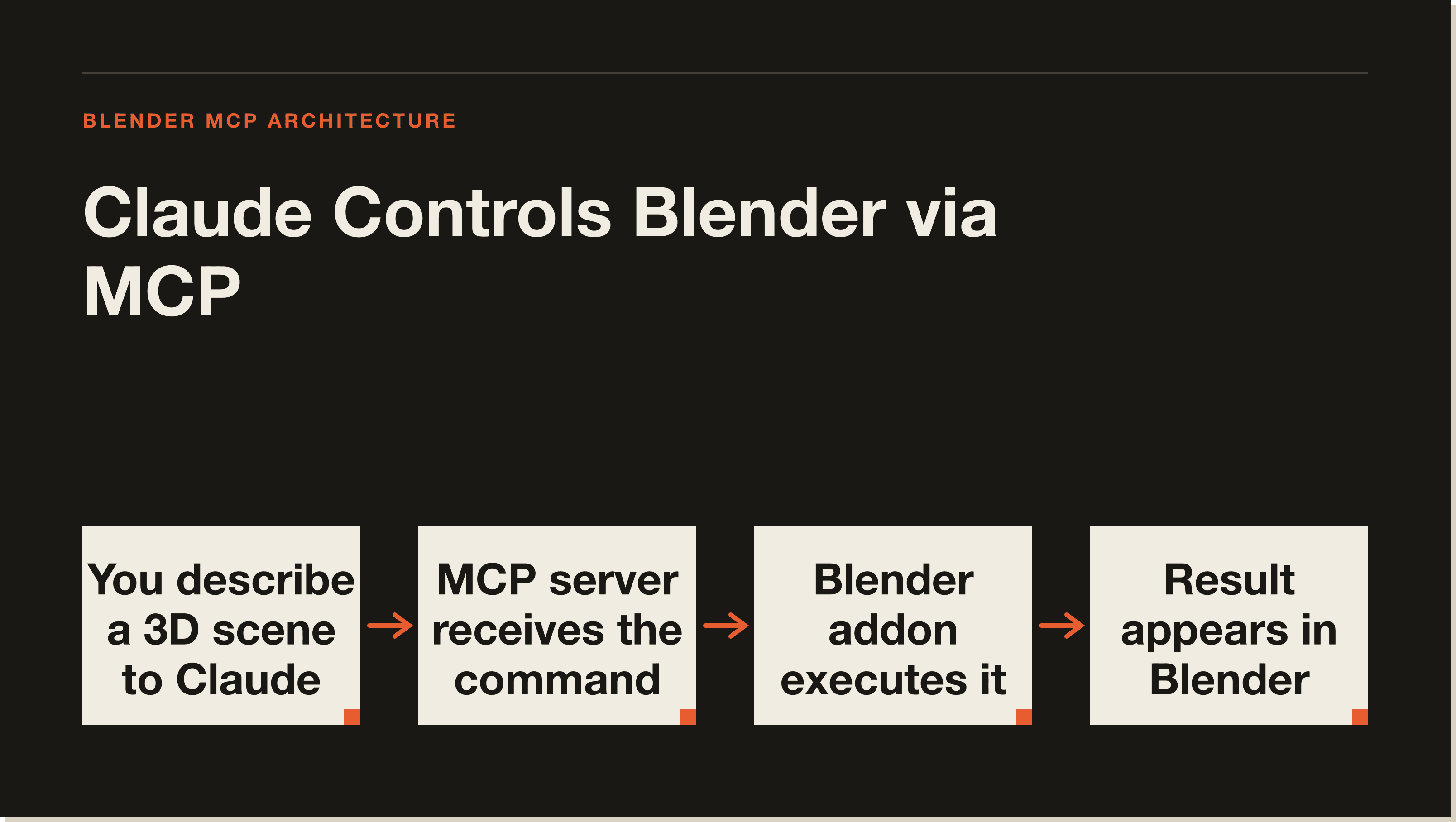
Blender MCP uses two components: a Blender addon that opens a socket server, and an MCP server that Claude connects to.
How Blender MCP works.
The system has two components. A Blender addon (addon.py) creates a socket-based server inside Blender and listens for commands. An MCP server implements the Model Context Protocol and connects to that socket. Claude talks to the MCP server, which relays instructions to Blender.
Communication uses JSON over TCP sockets. You install the addon into Blender, start the socket server from the addon panel, then connect Claude to the MCP server. Once connected, Claude can query the scene and send commands directly.
What you need before installing.
Before you install anything, check these requirements:
✓Blender 3.0 or later
✓Python 3.10 or later (for the MCP server)
✓The uv package manager
The uv requirement catches people off guard. It is a fast Python package manager that you install separately. If you already have it for other Python work, you are ready. If not, install it first before running the MCP server.
Installation steps.
Step 1: Download addon.py from the GitHub repository at ahujasid/blender-mcp.
Step 2: Open Blender. Go to Edit, then Preferences, then Add-ons. Click Install and select the addon.py file you downloaded.
Step 3: Enable the addon in the list. A panel called BlenderMCP appears in the sidebar (press N to open the sidebar if it is hidden).
Step 4: Click Start MCP Server in the BlenderMCP panel. Blender now listens for commands on a local TCP socket.
Step 5: Add the MCP server to your Claude configuration. The GitHub README has the exact JSON block for Claude Desktop. The server connects via the socket Blender just opened.
Once connected, tell Claude what you want in plain English and it starts working.
What Claude can do inside Blender.
The MCP server exposes several capabilities to Claude.
Claude can create, modify, and delete 3D objects. You can ask it to add a sphere, resize a cube, move an object to a specific coordinate, or delete the selected mesh.
Claude can apply and modify materials. Describe a colour or material property and Claude sets it programmatically.
Claude can inspect the current scene. It can tell you what objects exist, their positions, their materials, and their relationships before deciding what to change.
Claude can execute arbitrary Python code inside Blender via the execute_blender_code tool. The project documentation is direct about this: use it with caution. Arbitrary Python execution is powerful, but it can also crash Blender or corrupt your scene. Save before executing anything non-trivial.
Claude can download assets from Poly Haven, the open-source 3D asset library, and integrate them into your scene. The project notes that Poly Haven integration can be erratic. Treat it as a useful but unreliable extra rather than a core workflow.
Claude can also generate 3D models through Hyper3D and bring them into the scene.
Real examples from the community.
The examples that circulate most in the 3D community show the range of what is possible.
Someone asked for a low-poly dungeon scene with a dragon guarding treasure. Claude created the geometry, placed the elements, and applied simple materials for the whole scene.
Beach scenes using HDRIs and environmental assets have been recreated with simple descriptions, including HDR sky lighting pulled from Poly Haven.
Architectural walkthroughs and product visualisation mockups have been built by describing the space or product and letting Claude generate the scene structure.
These are impressive demonstrations. They are also the cleaner end of what you will get. Complex, precise work still benefits from reviewing what Claude produced and iterating.
What to keep in mind.
The execute_blender_code tool is the most powerful and the most dangerous. Claude uses it for operations the specific MCP tools do not cover. Save your work before any complex operation. If Claude runs code that crashes Blender, your unsaved changes are gone.
The Poly Haven integration works inconsistently. Sometimes Claude loads assets cleanly. Sometimes the request fails. Build workflows that can handle that gracefully.
Complex operations work better in smaller steps. Instead of asking for a fully detailed scene in one prompt, build it in stages. Claude tends to produce cleaner results when it can inspect what it just created and iterate.
Blender MCP FAQ.
Does Blender MCP work with Claude Code?
The project is primarily designed for Claude Desktop, Cursor, and VS Code. Claude Code can connect to any MCP server, so it is possible to wire up Blender MCP through your .mcp.json, but the standard setup targets the Desktop app. Check the GitHub README for the current recommended configuration.
Do I need programming knowledge to use Blender MCP?
You need to be comfortable installing a Blender addon and editing a JSON config file. After that, you describe what you want in plain English. The Python execution happens on Claude's side, not yours.
Is Blender MCP free?
The MCP server and addon are open-source and free. Your Claude usage costs what it normally costs. There are no additional fees for Blender MCP itself.
Can Claude MCP replace a 3D artist?
No. Claude MCP speeds up the structural and scripting side of 3D work. Detailed modelling, UV unwrapping, rigging, and animation still need a skilled artist. Use it to prototype fast, generate base meshes, and automate repetitive Python tasks, not as a replacement for craft.
Where is the GitHub repository?
The repository is at github.com/ahujasid/blender-mcp. The README has the full installation guide and configuration JSON for each supported client.
Five interactive lessons. Install Claude Code, build your first automation, and deploy it live on the internet — all in under an hour. Free, no coding required.