← Back to Blog
Claude Code Plan Mode: When and How to Use It in 2026.
Claude Code plan mode explained: the Shift+Tab shortcut, /plan open command, four scenarios where it wins, and how to save a plan to a file.
Claude Code plan mode explained: the Shift+Tab shortcut, /plan open command, four scenarios where it wins, and how to save a plan to a file.
Claude Code plan mode is a read-only mode where Claude reads your codebase, asks questions, and produces a step-by-step plan before it touches a single file. Write tools are disabled. You read the plan, approve it, and Claude runs it.

I'm Tom. I run Claude Code every day across content tools, n8n workflows, and Next.js apps. Plan mode is the difference between Claude shipping a clean refactor in one shot and Claude shotgunning twelve files in the wrong direction. This post covers what plan mode is, the shortcut Anthropic does not advertise, four scenarios where it wins, the new /plan open command added in v2.1.119, and how to save a plan to a file for review.
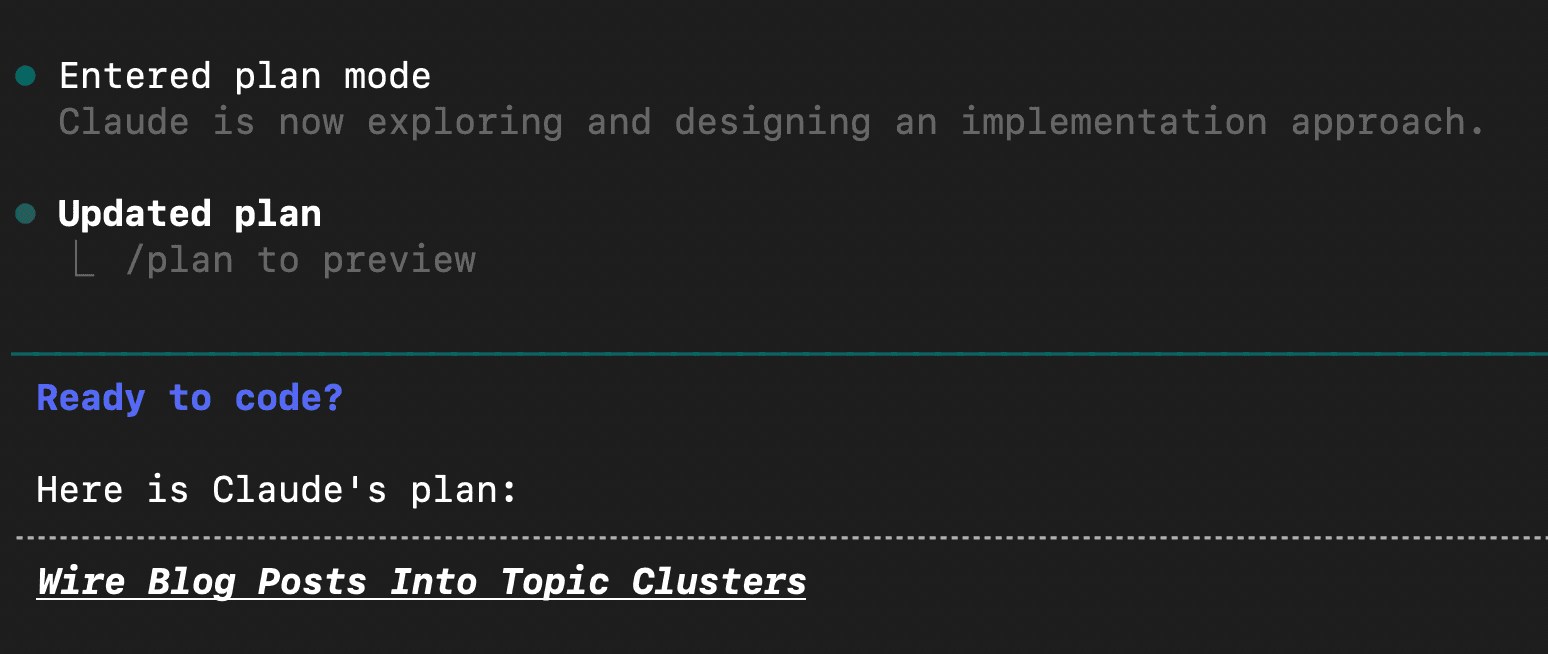
Claude Code plan mode is a built-in mode that disables Claude's write and execute tools so it can analyze your code and propose a plan without making changes. You enter it with the /plan command or by pressing Shift+Tab. Claude then reads files, asks clarifying questions, and outputs a structured plan. You approve the plan and Claude carries it out.
Anthropic introduces plan mode in the common-workflows doc as the recommended approach for any non-trivial change. Read, Grep, and Glob work in plan mode. Edit, Write, and Bash mutations are blocked. Read the official docs here, and the v2.1.119 and v2.1.120 fixes are documented in the public release notes on GitHub.
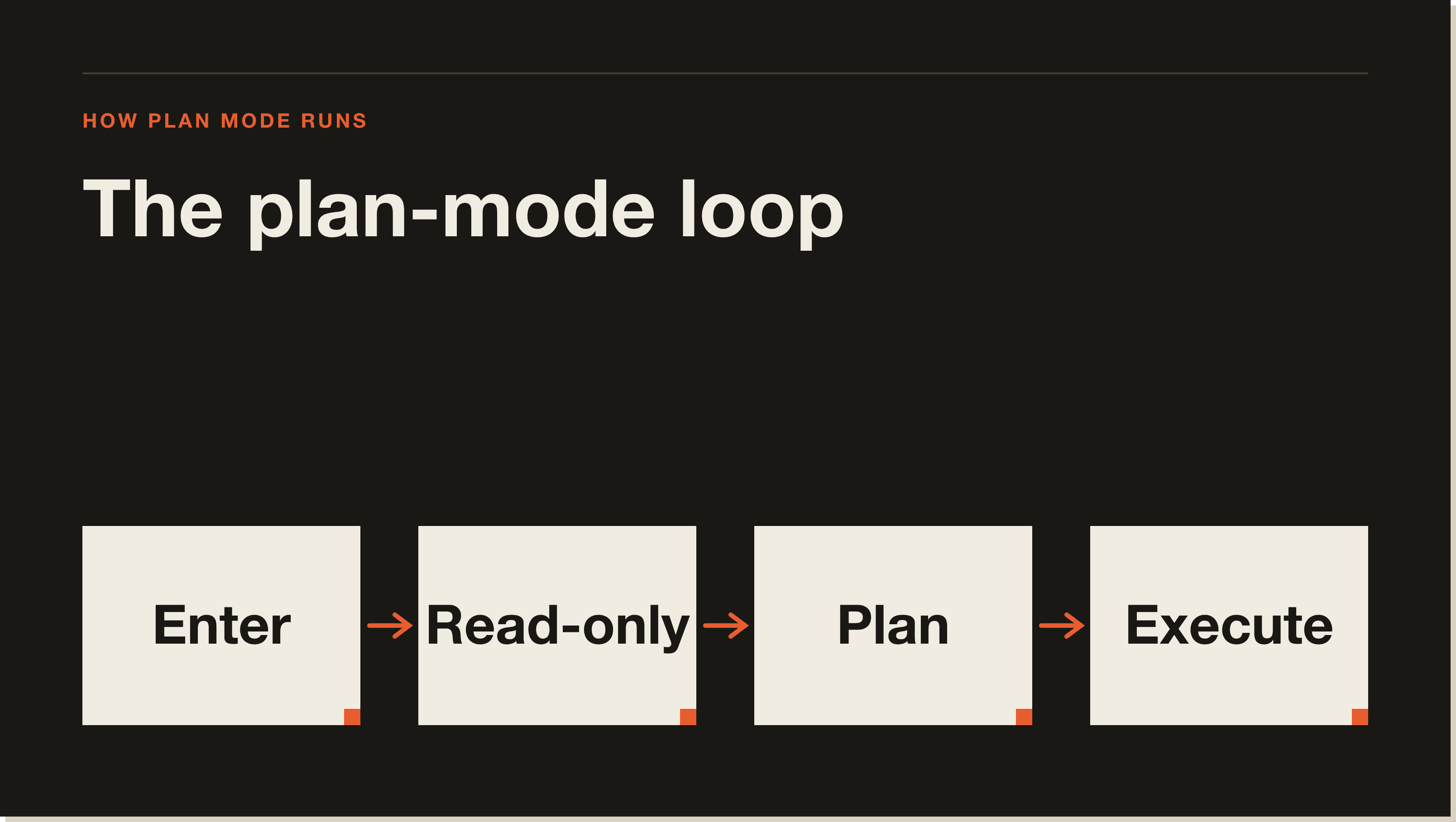
Plan mode flips Claude into a constrained tool set. Edit, Write, and any mutating Bash command go away. Read, Grep, Glob, and read-only MCP tools stay. The model and context are the same. The system prompt is augmented to tell Claude it is planning, not executing.
Claude walks the codebase, asks targeted questions, and produces a numbered plan in the terminal. Once you approve, plan mode exits and Claude runs the plan with the normal tool set restored.
With write tools disabled, Claude cannot get partway through a task and create a half-finished mess. It cannot misread a file and patch the wrong function. The cost is one extra confirmation step. The benefit is a plan you can edit before any code changes.
There are three ways to enter plan mode. The slash command, the keyboard shortcut, and the new /plan open command added in v2.1.119. All three put you in the same state. Pick whichever fits your flow.
Type /plan and hit enter, or follow it with a task description to seed the plan. Claude reads the task, scans the relevant files, and produces a plan.
/plan refactor the email service to use the new SendGrid clientThis is the shortcut most people miss. Hit Shift+Tab in the Claude Code prompt to toggle plan mode on. Hit it again to toggle off. The status bar shows you which mode you are in. The Mac shortcut is identical to Windows and Linux. There is no separate Cmd combination.
Added in v2.1.119, /plan open re-enters plan mode on the plan Claude already drafted in the current session. The old behavior overwrote the existing plan. Now it picks up where you left off so you can edit or extend before approving.
The keyboard shortcut for Claude Code plan mode is Shift+Tab. It works on Mac, Windows, and Linux. There is no separate macOS variant. Press it once to enter plan mode, press it again to exit. The shortcut is the fastest way to toggle plan mode mid-session without breaking your flow.
Use plan mode when the work spans multiple files, when one wrong edit is hard to undo, or when you do not yet have a clear path through the change. Do not bother with plan mode for one-line fixes or single-file edits. The overhead is not worth it for trivial work. Below are the four scenarios where I always run plan mode first.
When I am renaming a core type or moving a shared utility, plan mode catches the import graph. Claude scans every file that references the target and lists each call site that needs updating. Without plan mode, Claude tends to fix the first three files, hit a build error, and start whack-a-mole patching.
Concrete example. I had a Sanity helper called formatPostBody living in three places. Plan mode showed me twelve files referencing it, three import paths to update, and one duplicate to delete. Claude shipped the change in one pass with zero build errors.
Schema work is the highest-stakes refactor in any codebase. Get it wrong and you corrupt production data. Plan mode is non-negotiable here. Claude reads the schema, migration tooling, seed data, and consumers, then tells you the order of operations and the rollback path.
Concrete example. I was adding a categories array to a Sanity post type. Plan mode flagged that existing posts had no category, the index page filtered by category, and the GROQ query would silently break without a fallback. None of that is obvious until you have shipped the broken version.
The terrible version of a library upgrade is Claude bumps the version, runs the build, sees forty errors, and starts fixing them in the order they appear. The good version is plan mode. Claude reads the changelog, scans every file using the library, and lists each breaking change with the file location.
Concrete example. I upgraded an n8n install from v1.x to v2.x and the node SDK had renamed three core helpers. Plan mode pulled the migration guide from the GitHub release, mapped each rename to the files that used it, and proposed the patch order. The actual upgrade took eight minutes.
Plan mode is underused for debugging. People reach for /debug or just describe the error and Claude jumps straight to a fix. Plan mode forces Claude to lay out the hypothesis, the evidence, and the verification step. You read the plan and can spot the wrong hypothesis before it ships.
Concrete example. A Sanity ISR cache was not invalidating after a publish. Claude's first instinct in normal mode was to add a manual revalidate call. In plan mode, Claude listed three causes, the file paths to inspect for each, and the test to confirm. The actual cause was the second hypothesis, not the first.
There are two ways to exit Claude Code plan mode. Approve the plan and Claude exits automatically and starts executing. Or hit Shift+Tab to toggle out without running anything. The second method is useful when you want to refine the prompt before letting Claude run.
There is no /plan close or /plan exit command. v2.1.119 made /plan open the canonical way to re-enter on an existing plan. Exiting is still done via Shift+Tab or by approving the plan in the terminal.
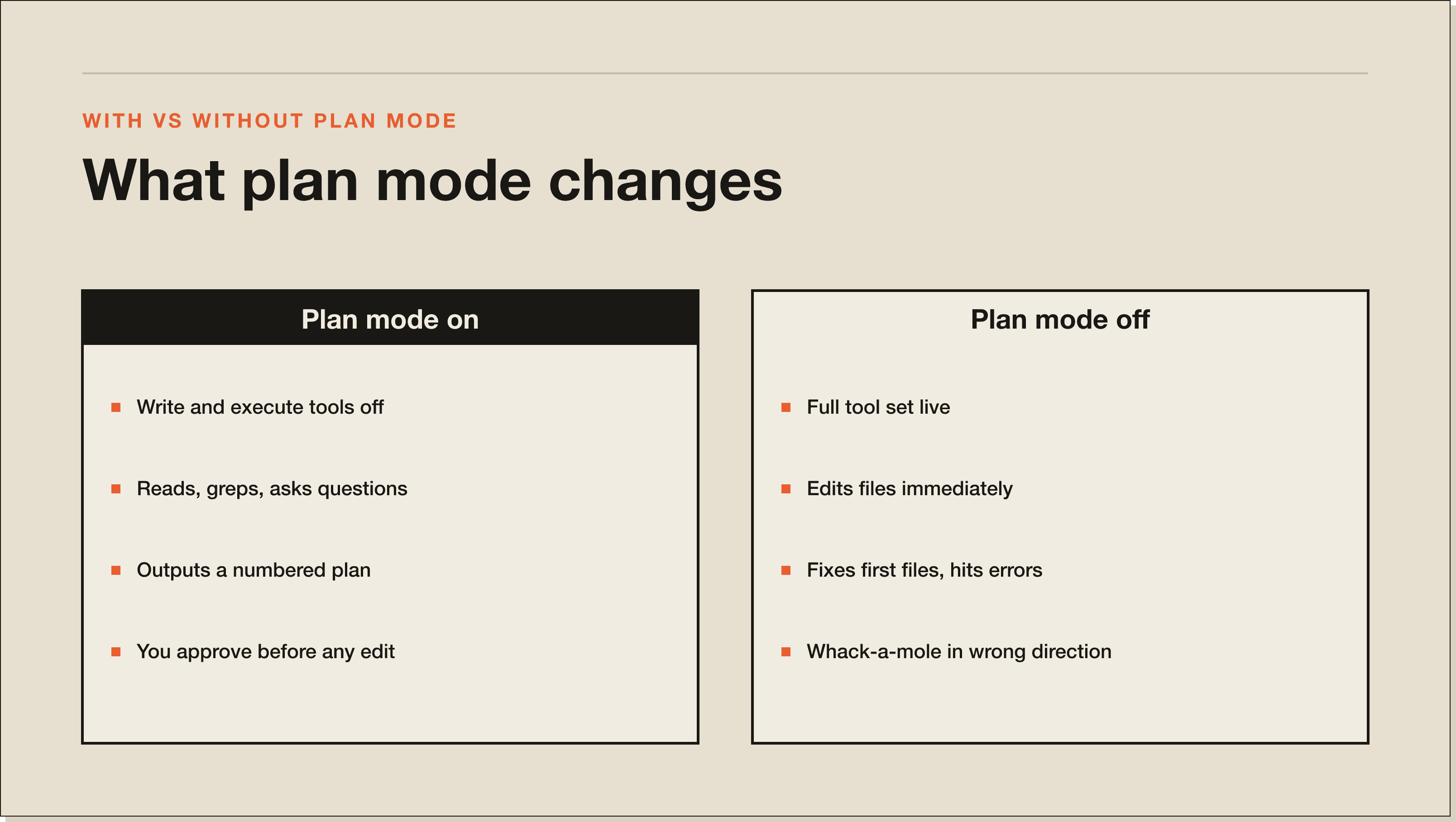
Plan mode and auto mode are opposites. Plan mode disables write tools and asks Claude to draft a plan first. Auto mode keeps all tools enabled and tells Claude to execute without asking permission for routine work. Plan mode is for high-stakes work where one wrong edit costs you. Auto mode is for low-stakes batch work where speed matters more than caution.
v2.1.120 fixed a bug where auto-mode instructions were overriding plan-mode behavior. If you saw Claude executing edits while it was supposed to be in plan mode in early v2.1.x builds, that was the bug. Update to v2.1.120 or later and plan mode will hold even when auto-mode prompts are in scope.
Accept edits mode is a third option. It keeps write tools enabled but pauses for human approval before each edit lands. It is the middle setting between plan mode and auto mode. Use accept edits when you trust the strategy but want to vet each individual change.
Save a Claude Code plan to a file by asking Claude to write it. The most reliable method is to exit plan mode, then ask Claude to recreate the plan as a markdown file. You can also ask mid plan mode with a prompt like 'save this plan to plan.md before exiting'. Claude can write a plan file because writing markdown is not modifying the codebase.
I save plans for any change that touches more than three files. The plan becomes the change record. If something breaks two days later, I re-read the plan, see the assumed call graph, and figure out which assumption was wrong. I save them to a gitignored .planning directory under the project root.
Most plan mode issues come from one of three causes. You are on a build older than v2.1.120 where auto mode could override plan mode. You have a CLAUDE.md or skill instructing Claude to execute aggressively, which fights with plan mode. Or you are using /plan in a non-interactive context like a CI run, where Claude has no way to ask follow-up questions and the plan collapses into a single guess.
Check your version with claude --version. If you are below 2.1.120, run the update. The auto-mode override fix is the load-bearing change. Recent releases are documented on GitHub.
If you have system instructions that say 'execute immediately' or 'do not ask questions', plan mode is being told two contradictory things. Strip the aggressive auto-mode language from CLAUDE.md and any always-on skills. Move it to a /loop or /batch skill where it belongs.
Plan mode wants a human to approve. Running it in a CI job or a non-interactive prompt produces a degraded plan because Claude cannot ask the questions it needs to ask. For non-interactive runs, write a tighter spec up front and skip plan mode.
Yes. After Claude produces a plan and before you approve, you can ask Claude to revise it. Add steps, remove steps, or change the order. Once you approve and Claude starts executing, you cannot edit the plan in flight in the strict sense, but you can interrupt with Esc, drop back into plan mode with Shift+Tab, and ask Claude to revise the remaining steps based on what just happened.
This is the workflow I use most often on long migrations. Approve the first three steps, watch Claude run them, hit Shift+Tab when something surprises me, ask for a new plan that accounts for the surprise, approve, continue. v2.1.119 made this loop smoother by keeping the existing plan when you re-enter via /plan open.
Plan mode is not magic. It produces worse plans on codebases it has never read. The first /plan in a fresh session always pulls more files than the second, because Claude is still mapping the territory. A CLAUDE.md with the architecture layout is the difference between a five-file plan and a fifty-file plan.
It is also slow on huge repositories. On a 500-file Next.js project, the plan can take a minute or two to draft. The fix is to scope the prompt tightly. /plan refactor the email service is faster than /plan refactor the codebase. And plan mode does not catch external dependencies you have not surfaced. If the work depends on a Vercel env var or a Stripe webhook config, Claude will not know unless you tell it.
The keyboard shortcut for Claude Code plan mode on Mac is Shift+Tab. It is the same on Windows and Linux. There is no separate Cmd shortcut.
Yes. The VS Code extension supports plan mode the same way the terminal CLI does. The /plan command and the Shift+Tab shortcut both work inside the VS Code Claude Code panel.
Plan mode is designed for interactive sessions where you can read and approve the plan. Running it in a CI script will produce a degraded plan because Claude has no way to ask follow-up questions. For automated runs, write a precise prompt and skip plan mode.
Yes. Plan mode runs the same model on the same context as normal mode. It costs the same tokens and counts against your usage. The /usage command shows your current spend regardless of mode.
Plan mode is a Claude Code feature, so it is available wherever Claude Code is. As of mid-2026 that includes Pro and Max plans. The free Claude tier does not include Claude Code, so plan mode is not available there.
Not directly. Anthropic owns the plan mode system prompt and it ships baked in. You can shape the plans you get by writing a strong CLAUDE.md with architecture context and constraints. The model uses CLAUDE.md inside plan mode the same way it does in normal mode.
Plan mode and subagents are separate concepts. You can ask Claude to plan a task that delegates to a subagent. The plan will include the subagent call as a step. The subagent itself runs in its own context with its own permissions when the plan executes.
If this guide was useful, these go deeper on adjacent topics:
Primary sources referenced in this guide:
If you are new to Claude Code, start with the Claude Code Blueprint. It is a free 60-minute guide that walks you through installing, configuring, and shipping your first agent. If you want to go deeper, the 30-day challenge takes you from zero to running production automations. For the foundational tour, read my full Claude Code guide. For the difference between subagents and skills, see the sibling post.
Plan mode is the cheapest insurance policy in Claude Code. Two seconds to hit Shift+Tab. Thirty seconds to read the plan. Hours saved on the work that would have gone wrong.
Plan mode is a built-in read-only mode where Claude reads your codebase, asks clarifying questions, and produces a step-by-step plan before touching a single file. Write tools are disabled. Read, Grep, Glob, and read-only MCP tools stay on. You review the plan, approve it, and Claude runs it with the normal tool set restored. It is the cheapest insurance policy in Claude Code.
Three ways. Type /plan and hit enter, optionally followed by a task description. Hit Shift+Tab to toggle plan mode on (same shortcut on Mac, Windows, and Linux). Or run /plan open (added in v2.1.119) to re-enter plan mode on the plan Claude already drafted in the current session. All three land in the same state.
Use it when the work spans multiple files, when one wrong edit is hard to undo, or when you do not yet have a clear path through the change. The four scenarios I always use it for are refactors across multiple files, schema migrations, library upgrades, and tricky debugging. Skip plan mode for one-line fixes or single-file edits. The overhead is not worth it for trivial work.
Shift+Tab. Same shortcut on Mac, Windows, and Linux. There is no separate Cmd combination. Press it once to enter plan mode, press it again to exit. The status bar shows you which mode you are in. It is the fastest way to toggle plan mode mid-session without breaking your flow.
They are opposites. Plan mode disables write tools and asks Claude to draft a plan first. Auto mode keeps all tools enabled and tells Claude to execute without asking permission for routine work. Plan mode is for high-stakes work where one wrong edit costs you. Auto mode is for low-stakes batch work where speed matters more. v2.1.120 fixed a bug where auto-mode instructions could override plan mode, so update if you are on an older build.
Three usual causes. You are on a build older than v2.1.120 where auto mode could override plan mode (check with claude --version and update). You have a CLAUDE.md or always-on skill telling Claude to execute aggressively, which fights with plan mode. Or you are running /plan in a non-interactive context like a CI job, where Claude cannot ask follow-up questions and the plan degrades to a single guess.
Yes. Plan mode runs the same model on the same context as normal mode. It costs the same tokens and counts against your usage. The /usage command shows your current spend regardless of mode. The trade-off is that the planning step often saves you from a 50-file whack-a-mole patch loop later, which is the much more expensive failure mode.
Five interactive lessons. Install Claude Code, build your first automation, and deploy it live on the internet — all in under an hour. Free, no coding required.
Grab the Blueprint →