← Back to Blog
Claude Agent Teams: How to Run Multiple AI Agents at Once.
Claude agent teams let multiple Claude Code agents talk to each other and share a task list. How they work, setup, and whether they beat subagents.
Claude agent teams let multiple Claude Code agents talk to each other and share a task list. How they work, setup, and whether they beat subagents.
Claude agent teams are a Claude Code feature that spawns multiple agents which share a task list and message each other directly. A lead agent breaks the work into tasks, each teammate claims tasks and works in its own context window, and they coordinate peer to peer instead of reporting everything back up the chain.
This is the feature that shipped alongside Opus 4.6, and it goes further than the subagents people already know.
I'm Tom. I teach Claude Code for a living, and I went through the deep demos from Cole Medin, IndyDevDan, Shaw Talebi, and Bart Slodyczka to pull what works from what is still an experimental rough edge.
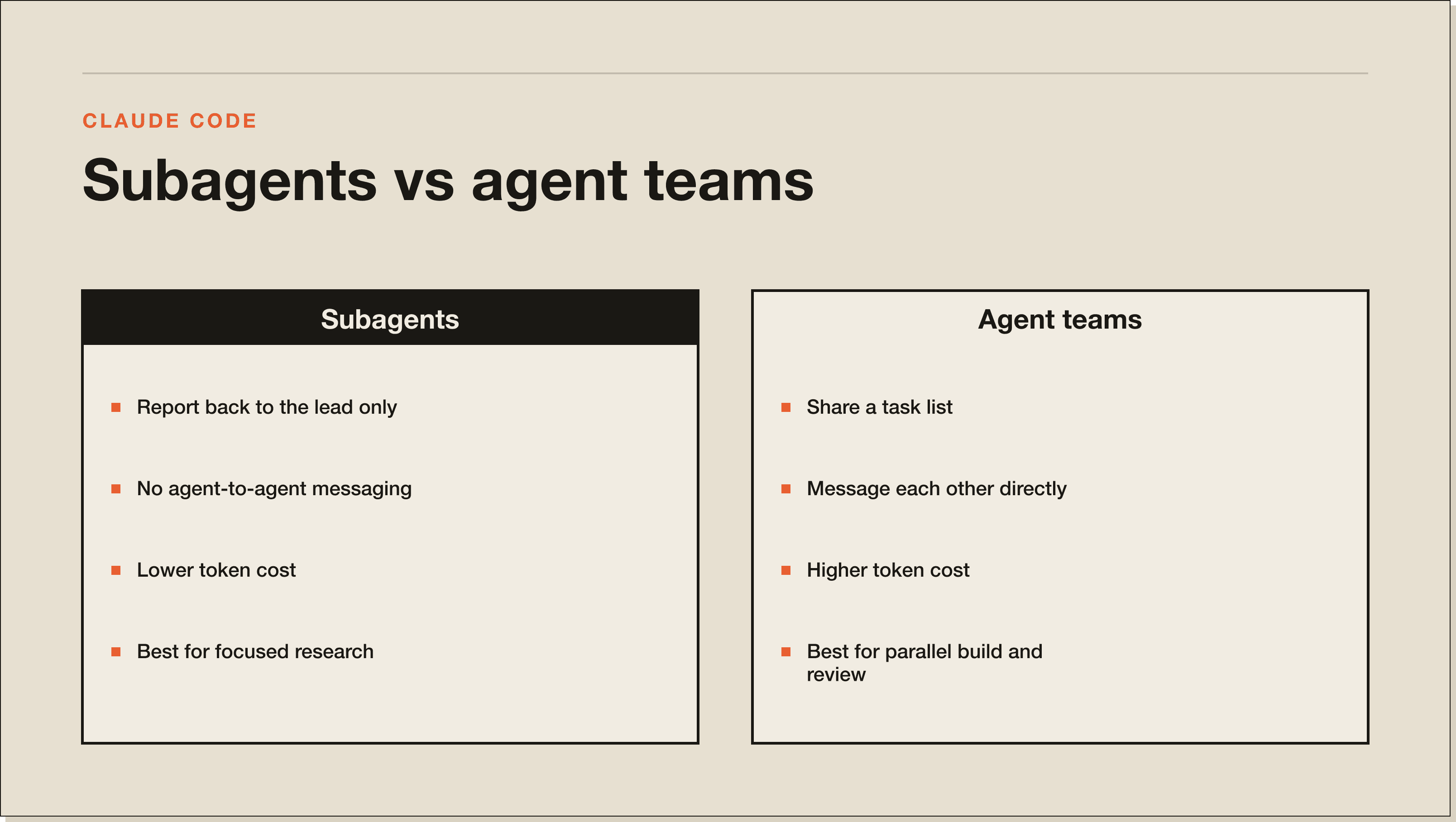
Agent teams are a coordinated group of Claude Code agents working the same goal at the same time. The old subagent model spawned isolated workers that returned a summary and nothing else. Agent teams let those workers talk.
Cole Medin describes the leap. "This goes way beyond subagents. These agents actually talk to each other like, let me complete this before you work on this."
Shaw Talebi frames the architecture cleanly. Subagents are centralized, a hub with spokes. Agent teams are a hybrid, a lead agent plus teammates that message each other directly.
A lead agent creates a team, creates a shared task list, and spawns teammates with specific roles. Each teammate has its own session and context window. They claim tasks, mark them done, and send messages without routing through the lead every time.
IndyDevDan lays out the full lifecycle in one line. "Create the team, create the tasks, spawn the agents, work in parallel, shut them all down, delete the team."
Under the hood there are three families of tools. Team management to create and delete the team. Task management to create, list, and update the shared board. And a send message tool, which IndyDevDan calls "the most important one of all." Deleting the team at the end is good hygiene, because it resets the context you no longer need.
Use subagents when the work does not need agents talking to each other. Use agent teams when it does, and when the task is complex enough to justify the extra tokens.
Mark Kashef gives the decision rule directly. "Do you need agents to speak to each other? If the answer is no, then you can use subagents. Is the task complex enough to justify the overhead of tokens? If yes, then use agent teams."
Cole Medin pipelines them. Subagents for research, because context isolation keeps the main thread clean. Agent teams for the actual build, where coordination pays off. If you are new to the distinction, start with Claude Code subagents vs skills.
Agent teams are experimental and disabled by default, so the feature sits behind a setting you turn on yourself. You need Claude Code v2.1.32 or later, so update first and check with claude --version.
Enable it by adding CLAUDE_CODE_EXPERIMENTAL_AGENT_TEAMS to your settings.json env block:
{
  "env": {
    "CLAUDE_CODE_EXPERIMENTAL_AGENT_TEAMS": "1"
  }
}
That setting comes straight from Anthropic's orchestration docs, not a transcript, so it is the real key. You can set it globally in ~/.claude or per project in .claude/settings.json.
By default teammates run in-process, all inside your main terminal, which works anywhere. For split panes you need tmux or iTerm2, set through the teammateMode setting. Bart Slodyczka flags the order that trips people up. Start the tmux session first, then launch Claude, not the other way around. Split panes do not work in VS Code's terminal or Windows Terminal.
Then invoke it with the words Anthropic uses in its own examples, like "create an agent team." Bart and Mark both warn that vague prompts make Claude hallucinate weird teams or fall back to plain subagents.
The demos show both the ceiling and the current reality. These are real runs from named builders.
Cole Medin ran four agents at once on a live code review, splitting security, code quality, and documentation across the team in tmux panes. The lead agent decided the team composition from a short prompt and built the shared task list itself.
IndyDevDan pushed it hardest. He one-shotted 8 full-stack apps, then used a Haiku team under an Opus lead to investigate all 8 codebases, leaving his primary agent at only 31 percent context because the work was offloaded.
Then there is the contrarian data point. Shaw Talebi ran the only real A/B test, subagents versus agent teams on identical tasks. Teams were faster. But "the subagents consistently produce better outputs than the teams," and he concluded he would "stick to subagents for actually getting stuff done."
The honest summary is that agent teams are powerful and not yet reliable. Plan around three things.
Token cost is the big one. Cole saw two to four times the usage of a single agent. Mark Kashef was blunter. "It swallows up tokens like a vacuum. You could spend anywhere between 100 to 300,000 tokens just spinning up and executing an agent team."
The feature is also not great at using itself yet. Cole found it hallucinates teams without precise prompts, and Mark watched the lead agent start coding instead of delegating, "stepping on the toes of its sub-employees." Output quality still trails subagents for now, which is Shaw's whole point.
Use them today for parallel research, code review across a large codebase, and experiments where speed matters more than polish. They genuinely shine when the work splits cleanly into independent lanes.
Skip them for tasks that must run in sequence, or where output quality is the priority, where subagents still win. Treat agent teams the way Mark frames it, like a bootstrapped founder hiring staff. You only spawn a team when the job is big enough to justify the payroll.
Subagents are isolated workers that return only a summary, with no agent-to-agent communication. Agent teams share a task list and message each other directly. Subagents are better for clean research and quality output today. Agent teams are better for parallel, coordinated work.
The feature is free inside Claude Code, but it consumes API tokens fast, often two to four times a single agent. On usage-capped plans you can hit limits mid-run, so budget for the extra token cost.
For split-pane visibility, yes. Claude Code supports tmux and iTerm2 for showing each agent in its own pane. It does not work inside VS Code or Cursor, and Windows needs WSL.
There is no hard cap, but Mark Kashef found diminishing returns past roughly five or six agents. More agents means more token burn and more chances for them to overwrite each other's work.
No. Agent teams are a built-in Claude Code feature for orchestrating multiple agents in the terminal. The Claude Agent SDK is a separate toolkit for building your own agents in code.
Agent teams are an advanced move on top of solid Claude Code fundamentals. If you want those fundamentals fast, grab the free Claude Code Blueprint, then install real working systems in the 30-day challenge.
Five interactive lessons. Install Claude Code, build your first automation, and deploy it live on the internet — all in under an hour. Free, no coding required.
Grab the Blueprint →