← Back to Blog
Is the Claude Chrome Extension Safe?.
The Claude Chrome extension is safe for everyday business tasks, with real limits you need to know. Here's what Claude can see, what it can't, and when to keep it off.
Get your free AI audit.
Book a call →The Claude Chrome extension is safe for everyday business tasks, with real limits you need to know. Here's what Claude can see, what it can't, and when to keep it off.
The Claude Chrome extension is safe to use on everyday business sites, and that verdict comes with two conditions you should understand before clicking install. It is not a blank-check surveillance tool, and it is not a zero-risk sandbox either. What Claude can see is narrow and under your control. The safety trade-off depends on which sites you grant access to and whether you understand what autonomous mode actually does.
I've been running the extension on Pro and Team plans since it opened to those tiers on 18 December 2025, across client research workflows, CRM reading, and email drafting. Pro is $20/month. Max runs at $100/month or $200/month depending on the tier. Neither price tier changes what the extension can access, because the permissions model works the same across all paid plans. Most of the coverage I've read either exaggerates the risk or waves it away. Neither is useful if you handle client data or work in a regulated space. This post gives you the actual picture.
---
---
The Claude Chrome extension is a browser add-on from Anthropic that lets Claude read the content of pages you're on, fill in forms, click buttons, and chain actions across tabs. It connects your active browser session to your Claude conversations so Claude can act on what it sees, rather than waiting for you to copy-paste content manually.
Anthropic launched it as a pilot to roughly 1,000 Max plan users in August 2025, expanded to all Max subscribers in November 2025, and opened it to Pro, Team, and Enterprise plans on 18 December 2025. It installs from the Chrome Web Store and authenticates against your existing Claude account. It works on Chrome and any Chromium-based browser: Edge, Brave, and Arc are all supported.
It is worth being clear about what it is not. It is not a passive sidebar assistant that reads everything you visit. It is not spyware. It does not activate until you ask it to act on a page, and it only has eyes on pages you have explicitly enabled in the settings panel. That distinction matters a lot for the safety question.
---
The extension can read text content, form fields, and page structure on sites you explicitly grant it access to. That is the full scope. It reads pages you approve, one at a time, in the extension settings panel.
It cannot read sites you haven't granted. It cannot read your passwords, stored payment details, or browser history. Anthropic also blocks specific categories automatically, regardless of what you enable: financial services sites, adult content, and pirated content are off-limits at the platform level.
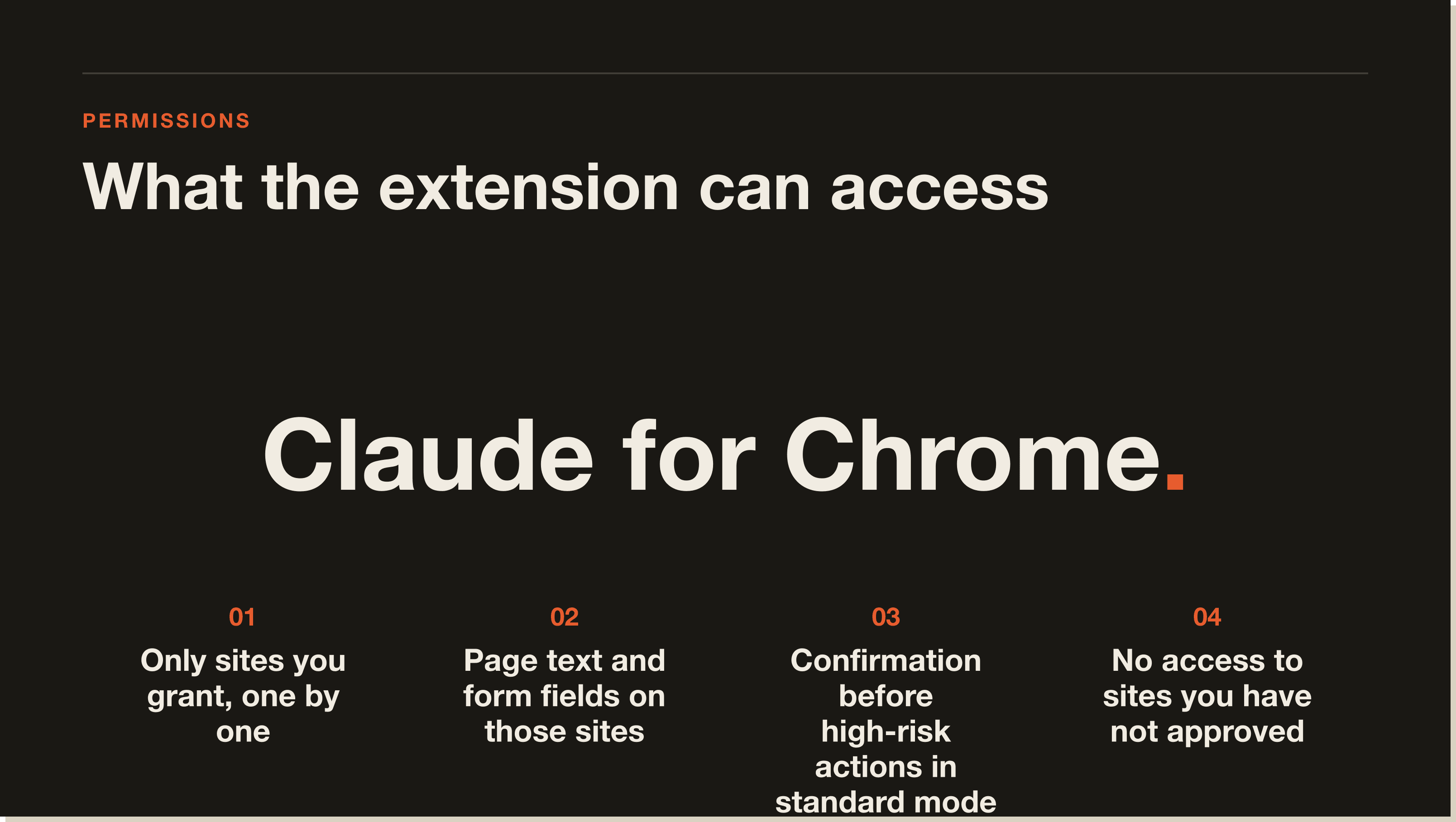
When Claude reads a page, that page content travels to Anthropic's servers for processing. This is how the AI works. The content is handled under Anthropic's privacy policy the same way any message you send to claude.ai is handled. You are not in a local sandbox. If the page content is sensitive, treat granting access to that site the same as you'd treat typing that content into claude.ai directly.
The privacy question most business owners actually need to answer is this: does the content on this page contain anything I'd be uncomfortable sending to Anthropic via the regular chat interface? If yes, don't enable that site. If no, the extension adds no meaningful risk beyond what you've already accepted by using Claude at all.
There is one more nuance for people on paid plans. Pro and Max plan users are on Anthropic's standard terms. Enterprise plan users can negotiate a data processing addendum, which governs how Anthropic handles your data under frameworks like GDPR or HIPAA. If you operate in a regulated industry, the Enterprise DPA is the right configuration before the extension touches any client-facing data.
---
Most people install the extension and never change the default mode. That default is standard mode, and the distinction is important.
Standard mode is the right starting point. Claude asks for confirmation before submitting forms, making purchases, or sharing data. Autonomous mode is for workflows you've already tested and trust, not for exploration on new sites.
Even in autonomous mode, Anthropic maintains additional safeguards on the most sensitive actions. That means Claude will still pause on certain high-risk steps, but you should not rely on that as your only check. Review any autonomous workflow before you run it unattended.
The practical framing I use with clients: start every new workflow in standard mode. Watch what Claude does at each step. When you've run it five or six times and understand exactly what it touches, switching to autonomous mode is a reasonable call. Flipping to autonomous on day one, on a site you've never granted access to before, is the mistake. In my own setup I keep autonomous mode off by default for any site that handles client financial pages or contracts, regardless of how familiar the workflow is. That is where things go wrong, and not because the extension is unsafe, but because you haven't built enough context to know what "safe" means for that specific workflow.
---
Anthropic published adversarial testing data alongside the Claude for Chrome announcement. Prompt injection is the attack where a malicious actor embeds hidden instructions in a web page designed to trick Claude into taking unintended actions, like exfiltrating data from the page or clicking something you didn't ask it to click.
Here is what the numbers actually show. Without safety mitigations, adversarial testing achieved a 23.6% success rate on prompt injection attacks. With Anthropic's current mitigations in place, that number dropped to 11.2%. On browser-specific attack scenarios specifically, mitigations reduced success rates from 35.7% to 0%.
Most of the coverage I've seen treats the 11.2% figure as alarming. When I tested the extension across my standard client research sites (HubSpot pages, supplier portals, editorial sites), I didn't encounter a single injection attempt in normal use. That framing is wrong in context. The adversarial tests are designed by researchers specifically trying to break the system, on pages engineered to contain malicious instructions. That is not your CRM, your email inbox, or the supplier sites you use every day.
For everyday business use on your own tools and trusted sites, the residual injection risk is a non-issue. Where it becomes relevant is autonomous mode, pointed at an unfamiliar page, without you reviewing what the workflow does. That is the specific combination that creates real risk. Standard mode on a trusted site, combined with Anthropic's mitigations dropping browser-specific attack rates from 35.7% to 0%, makes the exposure minimal.
The lesson is not that the extension is unsafe. The lesson is that you should use it on sites you trust. A corporate intranet you control is lower risk than a scraped content aggregator you've never visited. The fix for the injection risk is the same as the fix for everything else: grant access deliberately, start in standard mode, and expand from there.
---
You have complete control over site access, and the controls are immediate. In the extension settings panel, you grant or revoke access per domain. Claude cannot see any site you haven't explicitly enabled, and revoking access to a site takes effect instantly.
For Team and Enterprise accounts, admins can enforce org-wide allowlists and blocklists. That is the right configuration if you're rolling this out to a team, because it removes the decision from individual users and sets a consistent policy.
The practical approach: start with three or four sites you use daily and trust completely. Test simple tasks on each. Expand from there as you get comfortable with what Claude does in context.
---
For most business use cases, yes. The email reply drafting, competitive research across tabs, and CRM page reading are all genuinely useful and operate well within the safe zone: sites you control or trust, standard mode, no sensitive client data. These are the workflows that save 20 to 30 minutes a day and compound fast. I use it daily across Chrome and Arc, and the setup took me less than five minutes from install to first working task.
There are two categories where you should be more careful. If your work involves legal documents, medical records, or data covered by a confidentiality agreement, keep those sites off the enabled list unless you're on an Enterprise plan with the right data processing agreements in place. Anthropic's standard privacy policy covers standard plan usage, and for regulated industries that is not sufficient without Enterprise-level DPA coverage.
The second category is autonomous mode at scale. If you're building a workflow that runs unattended and touches forms or submissions, test it manually a few times first. Autonomous mode is powerful and the safeguards are solid, but "solid" and "zero-error" are different things.
The comparison that frames this most clearly: granting Claude access to your HubSpot contact page is no more sensitive than screen-sharing that page in a Zoom call. Granting access to a page full of client financial data is a different decision, and you should treat it as such.
For developers, the extension closes a workflow loop that previously required manual copy-paste between the terminal and the browser. If you're already working through how to use Claude Code, the browser integration is a natural next step. The two tools are designed to complement each other.
---
---
The Claude Chrome extension is safe for everyday business tasks on trusted sites with default standard mode settings. Anthropic automatically blocks financial services and other high-risk site categories. Prompt injection mitigations reduce adversarial attack success rates significantly on browser-specific scenarios. The main condition is: do not enable it on pages containing confidential client data, medical records, or financial accounts unless you have an Enterprise plan with appropriate data agreements.
Claude can access text content, form fields, and page structure on sites you explicitly grant it access to in the extension settings. It cannot read your password manager, browser history, payment details, or any site you haven't enabled. Anthropic also blocks financial services sites and other sensitive categories at the platform level regardless of your settings.
Prompt injection is an attack where hidden instructions embedded in a web page try to trick Claude into taking unintended actions. Anthropic published adversarial testing data showing their mitigations reduced prompt injection success rates from 35.7% to 0% on browser-specific scenarios. The risk is real but managed, and using the extension on sites you trust eliminates it for practical purposes.
Autonomous mode is safe for workflows you've tested and verified. In standard mode, Claude asks for confirmation before high-risk actions. In autonomous mode, it chains steps without pausing, though Anthropic still applies safeguards on the most sensitive actions. The right approach is to run a new workflow in standard mode first, review what Claude does at each step, and switch to autonomous only once you're confident in the workflow.
Yes. Access is granted site by site in the extension settings panel, and you can revoke any site instantly. Claude has no visibility into sites you haven't explicitly enabled. Team and Enterprise admins can also set org-wide allowlists and blocklists to enforce consistent policy across a team.
Yes, for the core use cases: drafting email replies in context, competitive research across tabs, CRM page reading, and form completion on known sites. These are all within the safe zone of standard mode on trusted sites. Businesses handling regulated data should stay on Enterprise plans with appropriate data processing agreements before granting access to any pages containing that data.
The two practical risks are: using autonomous mode on untrusted or unfamiliar sites before reviewing what the workflow does, and enabling the extension on pages containing data covered by confidentiality agreements or regulated by HIPAA, GDPR, or similar frameworks without the right Enterprise data agreements in place. Both risks are avoidable with deliberate setup.
Claude can only read pages on sites you've explicitly granted access to in the settings panel. It does not run in the background reading every site you visit. Nothing is processed until you actively use Claude on an enabled site. Anthropic handles the processed content under their standard privacy policy, which is the same policy that applies to everything you send to claude.ai.
---
---
Five interactive lessons. Install Claude Code, build your first automation, and deploy it live on the internet — all in under an hour. Free, no coding required.
Grab the Blueprint →