← Back to Blog
Claude Code vs Codex: When I Use Each (Honest Take).
Claude Code vs Codex from someone who runs both. The real differences, when I reach for Codex, and why Claude Code stays my default driver.
Claude Code vs Codex from someone who runs both. The real differences, when I reach for Codex, and why Claude Code stays my default driver.
Claude Code and Codex are both terminal-first AI coding agents that read your files, write code, run commands, and work across a whole project instead of handing you a snippet. Claude Code is Anthropic's agent. Codex is OpenAI's. They overlap heavily, and the honest answer to "which is better" is that I run both, Claude Code is my default, and Codex is the tool I reach for when I want a second opinion.
To be clear about names: Codex here means OpenAI's current coding agent, not the old 2021 Codex model that powered early Copilot. I'm Tom, I run Claude Code all day and keep Codex wired in as a rescue. This is the comparison from actually using them, not a spec-sheet readout.
[CTA-BLUEPRINT]
The core difference is the company and the model behind the agent, not the shape of the tool. Claude Code is Anthropic's coding agent and runs on Claude models. Codex is OpenAI's coding agent and runs on OpenAI's models. Both live in your terminal, both can plan and edit across files, and both run commands and tests on your behalf. If you have used one, the other will feel familiar fast.
Where they diverge is the surrounding ecosystem and the defaults. Claude Code leans hard into a deep extension layer: skills, hooks, subagents, slash commands, and MCP servers that let you shape the agent around your exact workflow. Codex comes bundled with a ChatGPT subscription and leans into multiple surfaces, including a CLI, an IDE extension, and a desktop app. The agent loop is similar. The thing built around the loop is where each shows its personality.
Codex is OpenAI's coding agent, and it is included with ChatGPT Plus, Pro, Business, Edu, and Enterprise plans rather than sold as a separate product. That bundling matters: if you already pay for ChatGPT, you already have Codex. It can write code that matches your project structure, explain unfamiliar codebases, review code for bugs, debug failures, and automate refactors and migrations.
Codex ships in three main forms. There is a CLI for working in the terminal, an IDE extension for working inside your editor, and a desktop app with its own local environment and review features. You point it at a task, it plans and edits, and you approve the changes. The workflow will feel immediately recognisable to anyone who has used Claude Code, because the agentic loop of plan, edit, run, review is the shared foundation of this whole category.
I do not pick one and abandon the other. I run Claude Code as my primary driver and keep Codex as a second opinion, and that split is deliberate. When Claude Code gets stuck on a gnarly bug, or I want a different model's take on an approach before I commit to it, I hand the same problem to Codex and compare. Two strong agents from two different labs rarely fail in the same place, so the disagreement itself is useful information.
This is easier than it sounds because I can trigger Codex from inside Claude Code through a plugin, so the second opinion is one command away rather than a context switch into another tool. The pattern is simple: Claude Code does the building, and Codex is the rescue I call when the first pass stalls or the stakes are high enough to want a sanity check. Most days I barely touch it. On the hard days it earns its place. If you want the broader picture of how I run Claude Code day to day, my how to use Claude Code guide covers the core workflow.
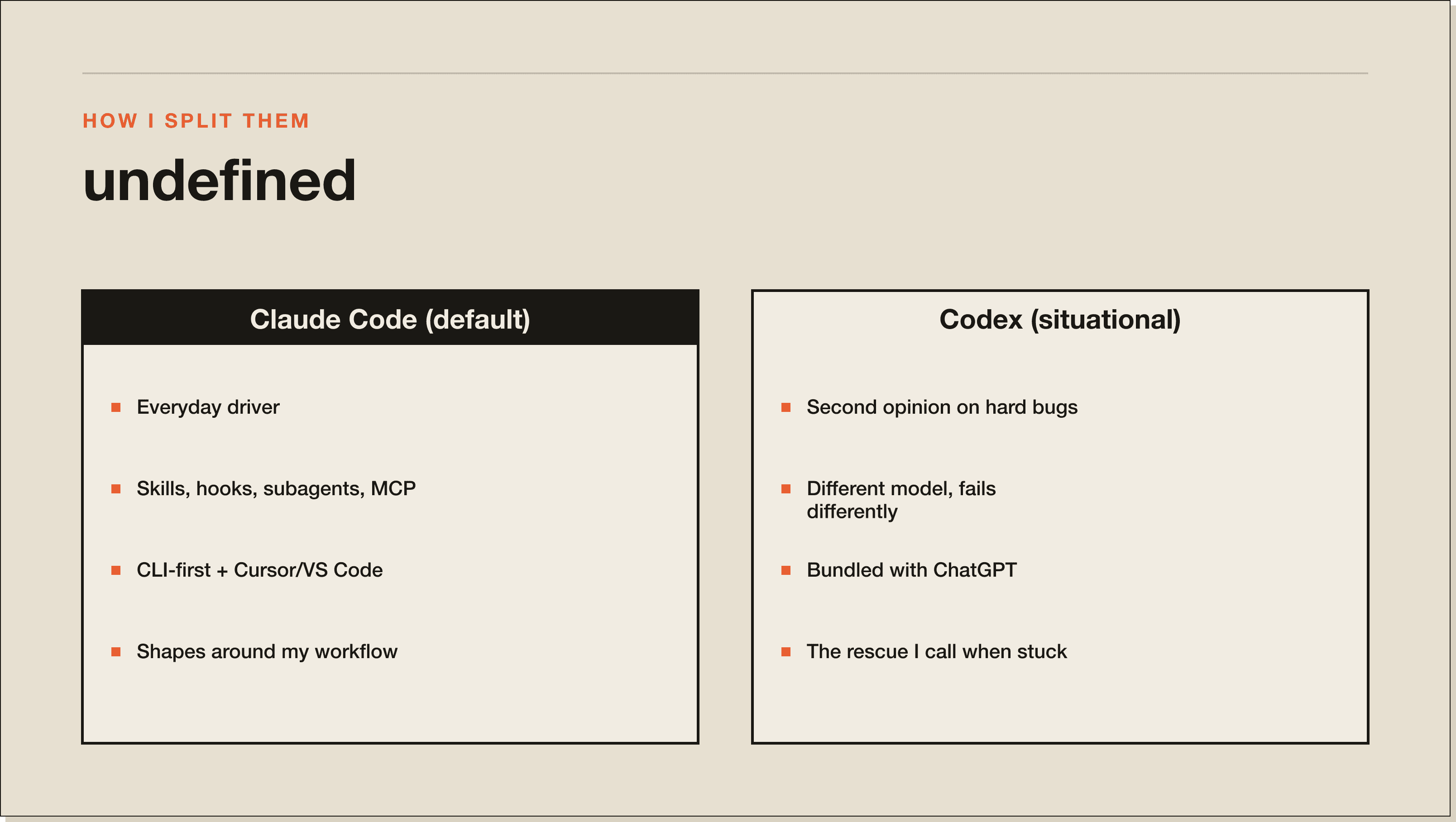
On raw capability the two are close, so the decision comes down to ecosystem, pricing model, and which model you trust on hard problems. Here is the split as I see it after running both.
For how Claude Code stacks up against the other tools in this space, I compared it directly in Claude Code vs Cursor and Claude Code vs Copilot.
Use Codex over Claude Code when you want a second model's take on a hard problem, when Claude Code has stalled on a bug after a couple of passes, or when you already pay for ChatGPT and not for Claude. Those are the three honest cases. A different lab's model genuinely fails differently, so a stubborn problem that beats one agent will sometimes fall to the other on the first try.
Use Claude Code as your default for everything else, especially if you lean on customization. The skills, hooks, subagents, and MCP ecosystem are what turn a general coding agent into a system shaped around your work, and that is where Claude Code pulls ahead for how I operate. The right answer for a lot of people is not one or the other. It is one as the driver and the other as the backup.
Claude Code's weak spot is that its depth has a learning curve. The extension layer that makes it powerful, the skills and hooks and subagents, is also more to learn than a tool that just answers prompts. If you only want quick inline help, that depth is overhead you will not use. It also requires a paid Claude plan, which is a second subscription if you already live in ChatGPT.
Codex's weak spot, for me, is exactly the mirror image: a thinner customization story than Claude Code's. It is an excellent agent, but I do not get the same deep hooks-and-skills control over how it behaves, which is why it stays my second opinion rather than my driver. Your mileage flips if you are already deep in the OpenAI ecosystem and value the bundling with ChatGPT more than the extension layer. Neither tool is bad. They are tuned for slightly different operators.
[CTA-BLUEPRINT]
Neither is strictly better. Claude Code has the deeper customization layer with skills, hooks, subagents, and MCP servers, while Codex comes bundled with a ChatGPT subscription and spreads across a CLI, IDE extension, and desktop app. I run Claude Code as my default and use Codex as a second opinion on hard problems.
Yes, and it is a strong setup. I run Claude Code as my primary agent and hand the same problem to Codex when I want a second model's take or when Claude Code has stalled. Two agents from different labs rarely fail in the same place, so comparing their answers is genuinely useful.
Codex is included with ChatGPT Plus, Pro, Business, Edu, and Enterprise plans rather than sold separately, so if you already pay for ChatGPT you already have it. Claude Code similarly comes with a paid Claude subscription. In both cases you are paying for the subscription, and the coding agent is bundled in.
Codex runs on OpenAI's models, the same way Claude Code runs on Anthropic's Claude models. The practical takeaway is that they are built on different model families, which is exactly why running both gives you two genuinely different perspectives on a hard problem.
Reach for Codex when you want a second opinion on a tough problem, when Claude Code has been stuck for a couple of passes, or when you pay for ChatGPT but not for Claude. For everyday driving, especially if you use customization like skills and hooks, Claude Code is the stronger default.
Yes. Codex ships a CLI that works in the terminal much like Claude Code, alongside an IDE extension and a desktop app. The core agentic loop of plan, edit, run, and review is shared across both tools, so the terminal experience will feel familiar if you move between them.
Whichever agent you drive, the leverage is in knowing what to point it at and how to shape it around your work. My free Claude Code Blueprint walks you through your first real build in about sixty minutes, and the Challenge is where operators turn it into a system. Start with the Blueprint.
Five interactive lessons. Install Claude Code, build your first automation, and deploy it live on the internet — all in under an hour. Free, no coding required.
Grab the Blueprint →