← Back to Blog
Claude Code Settings: The settings.json Guide.
Claude Code settings live in settings.json across four levels. Here's the hierarchy, the precedence order, and the keys that actually matter.
Claude Code settings live in settings.json across four levels. Here's the hierarchy, the precedence order, and the keys that actually matter.
Claude Code settings live in settings.json files, and there are four of them at different levels: user, project, local, and managed. They stack, with the more specific file overriding the more general one, so a project setting beats your personal default and a managed setting beats everything. Knowing which file wins is most of what makes Claude Code configuration click.
I'm Tom, and I run a fairly opinionated settings.json: model pinned, reasoning effort turned up, session history kept far longer than the default, hooks wired in, and a hard deny rule on reading any .env file. This post covers where the files live, the precedence order, and the handful of keys worth setting on day one.
[CTA-BLUEPRINT]
The settings.json file is where Claude Code reads its configuration: which model to use, what tools it may run, environment variables, hooks, and more. It is plain JSON, and the same keys work in every one of the four settings files. The difference between those files is scope and who they apply to, not syntax.
A tip that saves real time: add "$schema": "https://json.schemastore.org/claude-code-settings.json" to the top of your file. Your editor then gives you autocomplete and inline validation for every available setting, so you stop guessing at key names.
Claude Code reads four settings files, each with a different scope. Understanding the four is the foundation, because a setting that "won't take" is almost always being overridden by a more specific file.
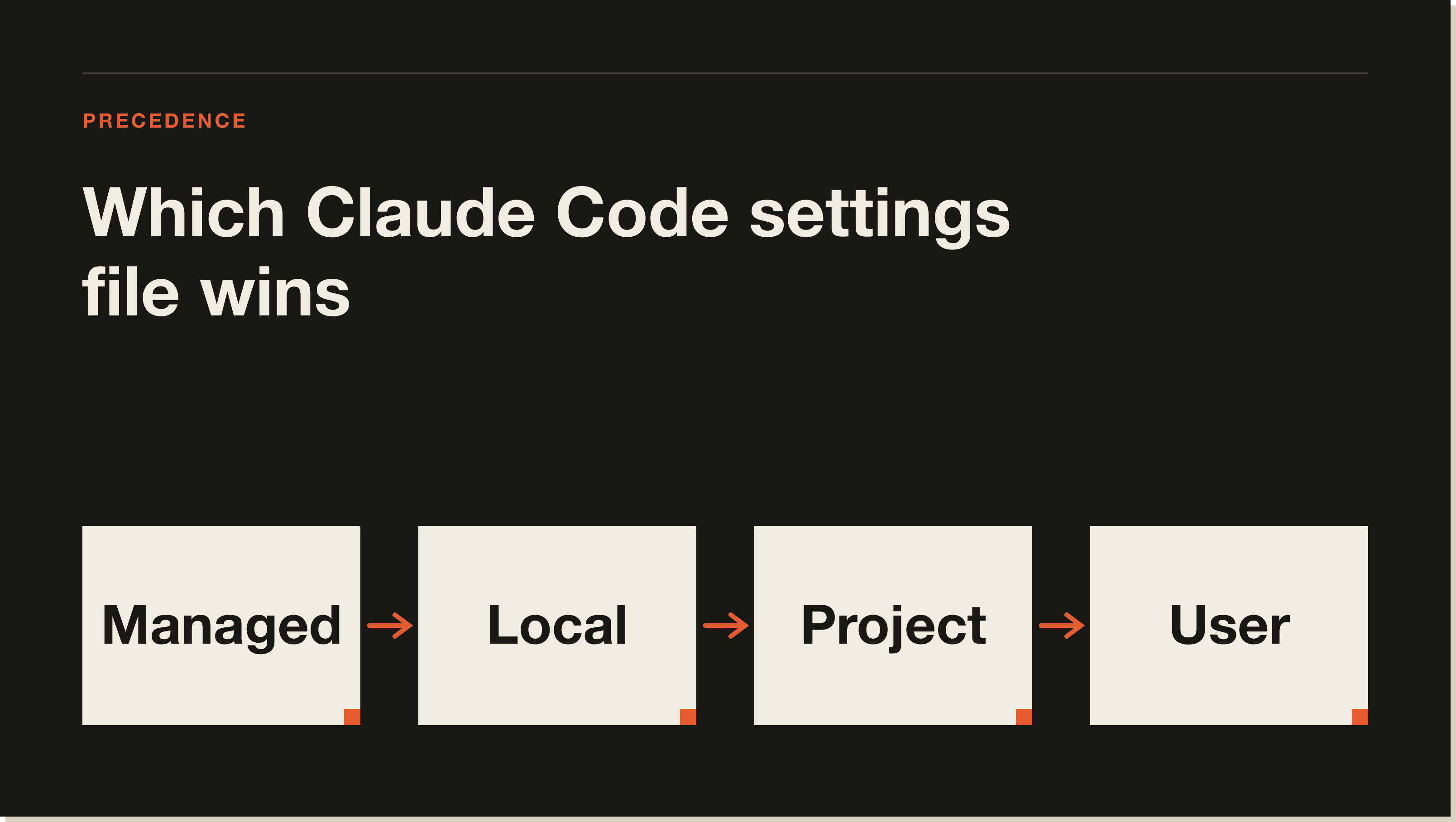
~/.claude/settings.json): your personal preferences across every project. Not shared..claude/settings.json): team settings committed to the repo, so everyone working in it inherits them..claude/settings.local.json): your personal overrides for one project, gitignored so they stay off the team.When the same key is set in more than one file, Claude Code applies them in a fixed order from highest priority to lowest: managed settings, then command-line arguments, then local, then project, then user. So a managed policy wins outright, a --model flag beats your files for that session, and your gitignored local file overrides the shared project file, which in turn overrides your global user defaults.
The practical rule that follows: put personal defaults in your user file, team agreements in the project file, and your own per-project tweaks in the local file. When a setting is not behaving, check whether a higher-priority file is setting the same key. That one habit resolves most configuration confusion.
You do not need to set most keys. A handful do real work, and these are the ones I actually touch. For the deeper subsystems, each has its own guide.
--model. Read once at startup, so it applies on the next restart.deny on reading any .env file so secrets never reach the model. This is the security-critical one. For the risky end of permissions, see Claude Code dangerously skip permissions.DISABLE_AUTOUPDATER or a git bash path on Windows. For what the update settings actually do, see how to control Claude Code updates.Here is a compact example that sets several of those at once, close to the shape of my own user file:
{
  "$schema": "https://json.schemastore.org/claude-code-settings.json",
  "model": "claude-opus-4-8",
  "permissions": {
    "deny": ["Read(**/.env)", "Read(**/.env.*)"]
  },
  "env": {
    "DISABLE_AUTOUPDATER": "0"
  },
  "cleanupPeriodDays": 90,
  "statusLine": { "type": "command", "command": "~/.claude/statusline.sh" }
}
Most settings reload automatically when you change them, including permissions and hooks. A couple, including model and outputStyle, are read once at startup and apply on the next restart. You can edit the file directly or use the /config command for an interactive interface, including /config verbose=true to change a single option without opening the UI.
[CTA-BLUEPRINT]
There are four. Your personal user settings live at ~/.claude/settings.json. Project settings shared with your team live at .claude/settings.json in the repo. Your gitignored personal overrides for a project live at .claude/settings.local.json. Managed settings are deployed by IT at a system path and cannot be overridden.
From highest to lowest priority: managed settings, command-line arguments, local settings, project settings, then user settings. A managed policy wins outright, a command-line flag beats your files for that session, and a more specific file overrides a more general one when they set the same key.
Project settings (.claude/settings.json) are committed to the repo and shared with your whole team. Local settings (.claude/settings.local.json) are gitignored and apply only to you in that project. Use project settings for team agreements and local settings for your own per-project tweaks that should not be shared.
Set the model key in your settings.json to the model you want as the default. You can override it for a single session with the --model flag, which takes precedence. The model setting is read once at startup, so a change applies the next time you start Claude Code.
Add a permissions block with a deny rule for the file path, such as denying Read on any .env file. A matching deny rule keeps both the file's contents and, with the IDE integration, the open-file notice from reaching Claude. This is the cleanest way to keep secrets out of the model's context.
Most do. Settings like permissions, hooks, and apiKeyHelper reload automatically when changed. A few are read once at startup and apply on the next restart, including model and outputStyle. Run claude doctor if you want to validate that your settings file is being read correctly.
hooks setting and the lifecycle events it fires on.Dialing in your settings is the groundwork. The payoff is what you build on top of it. My free Claude Code Blueprint walks you through your first real build in about sixty minutes, no coding required. Start there.
Five interactive lessons. Install Claude Code, build your first automation, and deploy it live on the internet — all in under an hour. Free, no coding required.
Grab the Blueprint →